Once I was asked a question related to File access over the web server.
The question was asked as follows...
"I have built an information maintenance system where files can be uploaded. Anyone can view those files.
But, the problem is when a file is viewed in the browser at that time if someone just copy the URL in some text file after that any body from any where can view that file by just pasting that URL in the browser's address bar.
How to prohibate this thing. PLZZZZZZZZZZZZZZZZZZZ help me...............
its verrrrrrrrrrrrrrrrry serious problem.............."
It was answered by a web expert Mr. Longor (his user id;) )as follows
"There's lots of ways to do this...the one that springs to mind is have a simple referer check at the top of your file-page and if the referer is not coming from your site, then simply redirect the browser to an error page of your choosing.
You can also use .htaccess on linux servers to accomplish this type of thing."
I answered as follows:
"yes neil dear
that was to appen
actually u r asking a questionn of basic security
what u can do is to change the access configurations from .htaccess file
or else use MySql at the back end and save those info in a database (password protected)
This will surely solve the problem!!"
To the answer by previous web expert I replied as follows...
"langsor gave a good solution
Bt basic problem is that the solution posted by him works only if your pages are php. But they may be simple text files also. Because i feel u r using flat files as your database.
so .htaccess solution as adviced by him and me both are correct.
and if in case your pages are php. then well good and fine. go on with the method of longor."
And then the person who asked the question clarified more as follows...
"Sorrrrrrry everyone,
actually i did not clear the problem to you, My files are in ".pdf" format...
Suppose,
http://localhost/information/sample.pdf
can be viewd ....... no login is required to do so..
if I cross the browser and after that in a new browser if I paste this URL then it should not be viewd......."
And then my final answer was
"ya i suppose now u gave correct explanation of ur problem
now only possible things are .htaccess
i need others to speak on this
Anyone to rescue neil of his situation??
easy bit... neil
lets see who solves first"
And guess what..
No one answered after this.
I was personally emailed to tell that the problem was solved by my approach. Gr888!!
The entire thread can be read at http://www.daniweb.com/web-development/php/threads/138376
Showing posts with label toughjamy. Show all posts
Showing posts with label toughjamy. Show all posts
Thursday, January 19, 2012


Monday, January 16, 2012
Is Google making an “Anti-iPad”- Google-Apple rivalry leading to new Android device by Google.
There has been a news circulating in the industry that Google is working on a device to compete with Apple's iPad. And now even according to the New York Times, "Eric Schmidt, the chief executive of Google, told friends at a recent party (obviously informal party) in LA about the new device. This, still an elusive device (with unknown birth time and unknown pregnancy status), would exclusively be running on the Android operating system." Google is the standard-bearer in the world of Web standards, also owner of busiest and biggest search engine, holds control over majority of blogs around the world, and gives platforms and APIs in which programmers should be able to run nearly any software on almost any computing device. So, entry of Google with this device would be very very exciting for us, the users; And very very dangerous for rival companies. So, should we expect an exciting and marvelous child-birth (sorry device-birth ;) ) from Google?
Some other sources stated that Google has been experimenting in protected-secret-and-low-hyped mode with a few content publishers to explore the possibility of delivering ebooks, emagazines and other content on a tablet. Some of my friends also told that it might also try to bag Kindle project too from Amazon, partially, even if it is not fully.
Read more about Google-Apple rivalry at http://www.macrumors.com/2010/03/14/apples-rivalry-with-google-gets-personal/
Cumon, it true that there is no proof of this deal. Just one of the gossips circulating from Silicon Valley. But we have seen such gossips turning into reality many many times.
This would again prove the so called Apple and Google technological rivalry. Also see http://www.businessweek.com/technology/content/aug2009/tc2009084_007016.htm
This new device, after ipad2, Galaxy S2, and Nexus devices, would take Google to the next level of Tablet market and thus creating a totally new “Anti iPad device”. Because who the hell will then care for iPad when it comes with heay price tag, selling problems (see Apple showroom got shutdown and stones pelted reports), Anti-flsh system (God knows why Flash is considered ‘heavy’ for Apple devices, and limited accessibility.
Some other sources stated that Google has been experimenting in protected-secret-and-low-hyped mode with a few content publishers to explore the possibility of delivering ebooks, emagazines and other content on a tablet. Some of my friends also told that it might also try to bag Kindle project too from Amazon, partially, even if it is not fully.
Read more about Google-Apple rivalry at http://www.macrumors.com/2010/03/14/apples-rivalry-with-google-gets-personal/
Cumon, it true that there is no proof of this deal. Just one of the gossips circulating from Silicon Valley. But we have seen such gossips turning into reality many many times.
This would again prove the so called Apple and Google technological rivalry. Also see http://www.businessweek.com/technology/content/aug2009/tc2009084_007016.htm
This new device, after ipad2, Galaxy S2, and Nexus devices, would take Google to the next level of Tablet market and thus creating a totally new “Anti iPad device”. Because who the hell will then care for iPad when it comes with heay price tag, selling problems (see Apple showroom got shutdown and stones pelted reports), Anti-flsh system (God knows why Flash is considered ‘heavy’ for Apple devices, and limited accessibility.
Tuesday, December 20, 2011
FaceBook TimeLine : Make Attractive Cover Profile. - Tips to start/ activate your Timeline view, its advantages and how to make more attractive profile. *
“Facebook TimeLine. Tell your story with a new kind of profile” – as explained by Facebook itself, Timeline gives a great look to your Facebook profile page.
The Facebook timeline is a feature on the social media platform that displays a user's posts and activity in chronological order. It allows users to see a history of their activity on the site, including posts, photos, videos, and other content they have shared. Some people may feel the urge to change their Facebook timeline for a variety of reasons. Some may want to clean up their timeline by removing old posts or photos that are no longer relevant, while others may want to update their timeline to reflect a change in their life, such as a new job or relationship. Additionally, some users may want to update their timeline to make it more visually appealing or to match their current interests and hobbies. It is important to note that users can edit or delete their post or photos at any time, they can also choose the level of privacy they want to set on each post. Overall, the Facebook timeline is a personal space that users can customize to their liking and preferences.
You can manifest a lot more, share easily, and control the layout more coolly, in the new facebook profile avatar. For better explaination you can visit
Facebook Timeline Details and Description (FAQ)
This new profile design that has rolled out this month is different from previous Facebook design updates. Tis time users will just love it: Timeline lets them be a designer.
The Timeline view of your profile basically divides your profile into three categories
1. Your Cover
2. Your Stories
3. Your Apps
For example you can see the following Pic of a Profile page in Timeline view: (click to enlarge the picture)
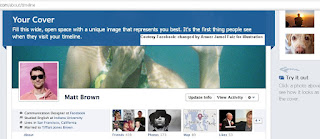
You can use an stunning pic, (or any interesting one for that matter), as the cover of your profile. This will be shown in wide view. And the profile pic that was initially used will also be visible in left corner.
Your stories are your day to day happening in a time line format.
And your Apps, are the collection of your Apps that you use and its activities.
Cover Photo must tell something. Your cover is the first impression of you a user will get when he or she goes to your page. But remember, Your profile photo should be of you; your cover photo can be anything.
Edit your photos Please!. The cover is a huge space, so a high-res photo will look best. You must crop to make it better.
Click and drag on the picture so that it looks good. Tis will automatically happen when you hover your mouse over the cover picture. You will be prompted to drag and drop your picture so that u can let best portion of the Photograph to be viewed.
Be creative in choosing Cover photo.Use Web sites that help you design your own cover and share it. Sites such as MyFBCovers and SiteCanvas
It is important to note that Facebook said it will automatically push the timeline live seven days after someone signs up for the new feature. However, if folks are content with what's shared after reviewing it, they can push it live themselves at any point within that period. This was already accessible to Facebook App developers via OpenGraph API, but now Facebook itself has launched timeline feature in Full Public Release making it available to million of users together.
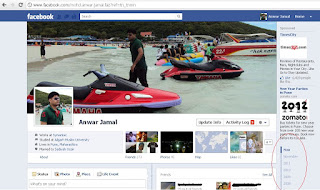
I am attaching a snapshot of my own profile in timeline view: (click to enlarge the image)
Or simply click here...
Get Facebook Timeline View Easily in a Click
And click on "Get It Now"
Now first of all, lets see what is Facebook TimeLine. Facebook describes it as following:
Add a cover
Edit your basic info
Jump to the past
View your activity log
See highlights from each month
Star stories you want to highlight
Add life events
Update your status
View and add photos
Share your app activity
This can be seen from the following page Help From Facebook Website Timeline
For example I have attached my Facebook Profile page. See the time line view in red circle.
Users can click on those places to go directly to specified time in your story. The new timeline feature will aggregate all your old Facebook stuff at one window and you/viewers will be able to switch between times (ie. month and year easily).
This new feature from Facebook, the largest Social Networking Website, is just awesome. And the entire outlook is just fabulous.
And just keep in mind, since this is new design, u will need time to get used to it. But during this time do not be forced to post something that u do not want everyone to see. For that purpose one simple question will pop up in ur brains that "How do I hide a story on my timeline?"
The answer is straighforward, To hide a story so that it no longer appears on your timeline:
Hover over the story and click button that appears on right of your post. (this is similar as before. only nomenclature has changed. !). Then Click Hide from Timeline.
Cheers to Facebook!
Cheers to the world!!
Please click on Advertisements because that fetches me liquid tonic used at real midnight cheers!! lol ;)
You can manifest a lot more, share easily, and control the layout more coolly, in the new facebook profile avatar. For better explaination you can visit
Facebook Timeline Details and Description (FAQ)
This new profile design that has rolled out this month is different from previous Facebook design updates. Tis time users will just love it: Timeline lets them be a designer.
The Timeline view of your profile basically divides your profile into three categories
1. Your Cover
2. Your Stories
3. Your Apps
For example you can see the following Pic of a Profile page in Timeline view: (click to enlarge the picture)

You can use an stunning pic, (or any interesting one for that matter), as the cover of your profile. This will be shown in wide view. And the profile pic that was initially used will also be visible in left corner.
Your stories are your day to day happening in a time line format.
And your Apps, are the collection of your Apps that you use and its activities.
Cover Photo must tell something. Your cover is the first impression of you a user will get when he or she goes to your page. But remember, Your profile photo should be of you; your cover photo can be anything.
Edit your photos Please!. The cover is a huge space, so a high-res photo will look best. You must crop to make it better.
Click and drag on the picture so that it looks good. Tis will automatically happen when you hover your mouse over the cover picture. You will be prompted to drag and drop your picture so that u can let best portion of the Photograph to be viewed.
Be creative in choosing Cover photo.Use Web sites that help you design your own cover and share it. Sites such as MyFBCovers and SiteCanvas
It is important to note that Facebook said it will automatically push the timeline live seven days after someone signs up for the new feature. However, if folks are content with what's shared after reviewing it, they can push it live themselves at any point within that period. This was already accessible to Facebook App developers via OpenGraph API, but now Facebook itself has launched timeline feature in Full Public Release making it available to million of users together.
I am attaching a snapshot of my own profile in timeline view: (click to enlarge the image)

Activating Timeline View
How to switch / convert to Cover page View / time line view in Facebook
You can activate this type of profile by visiting the page described above.Or simply click here...
Get Facebook Timeline View Easily in a Click
And click on "Get It Now"
Now first of all, lets see what is Facebook TimeLine. Facebook describes it as following:
What is a new Timeline view in facebook?
Your timeline is your collection of the photos, stories, and experiences that tell your story. Here are some of the things you can do on your timeline:Add a cover
Edit your basic info
Jump to the past
View your activity log
See highlights from each month
Star stories you want to highlight
Add life events
Update your status
View and add photos
Share your app activity
This can be seen from the following page Help From Facebook Website Timeline
For example I have attached my Facebook Profile page. See the time line view in red circle.
Users can click on those places to go directly to specified time in your story. The new timeline feature will aggregate all your old Facebook stuff at one window and you/viewers will be able to switch between times (ie. month and year easily).
This new feature from Facebook, the largest Social Networking Website, is just awesome. And the entire outlook is just fabulous.
And just keep in mind, since this is new design, u will need time to get used to it. But during this time do not be forced to post something that u do not want everyone to see. For that purpose one simple question will pop up in ur brains that "How do I hide a story on my timeline?"
The answer is straighforward, To hide a story so that it no longer appears on your timeline:
Hover over the story and click button that appears on right of your post. (this is similar as before. only nomenclature has changed. !). Then Click Hide from Timeline.
Cheers to Facebook!
Cheers to the world!!
Please click on Advertisements because that fetches me liquid tonic used at real midnight cheers!! lol ;)
Thursday, February 17, 2011
Unix Commands related to Handling files
Without an introductory speech let me come directly to the point.
Listing files in a directory
ls
list the files in the current directory
ls -a
list ALL files, even ones which begin with a dot, which are normally omitted
ls -s
list files, with their sizes
ls -l
list files, giving full details about each file
ls -al mydir/
list all files in directory mydir (including those beginning with a dot), giving full details about each file
ls *.c
list the files which end ".c"
ls mydir/
list the files in directory mydir
Moving or renaming files (IMHO please consider both the same if you are on Unix flavored OS or on Mac)
Examples:
mv oldname newname
rename a file
mv myfile mydir
move a file into another directory
mv myfile1 myfile2 myfile3 mydir
move several files into another directory
To Copy files
Examples:
cp oldname newname
make a copy of a file
cp myfile mydir
make a copy of a file in another directory
cp myfile1 myfile2 myfile3 mydir
make a copy of several files in another directory
To Delete files
Examples:
rm file...
delete the specified files
rm -i file...
ask for confirmation before deletion
rm -f file...
don't ask for confirmation before deletion. BE CAREFUL!
rm -r directory
Delete directory and everything in it. BE CAREFUL! To remove empty directories, see rmdir
rm -rf directory
Delete directory and everything in it, without asking for confirmation. Hey man its not the magic. Actually –rf tells the OS to suppress asking for confirmation. Actually there is never a magic in Software Arena. It’s all how deeper you go, and how diversified the developers approached to a problem. But defects/bug usually come as a magic!! (Some say, if you understand a woman, it is a magic in itself. Have I understood my Girlfriend and would be wife yet!!!!)
You can write me at toughjamy@yahoo.com.
To Know me professionally visit ..Linked In..
You can befriend me at ..FaceBook..
Read jokes at ..Jokes Limitless..
You can also know more about me at ToughJamy : An Informal Me!!
Listing files in a directory
ls
list the files in the current directory
ls -a
list ALL files, even ones which begin with a dot, which are normally omitted
ls -s
list files, with their sizes
ls -l
list files, giving full details about each file
ls -al mydir/
list all files in directory mydir (including those beginning with a dot), giving full details about each file
ls *.c
list the files which end ".c"
ls mydir/
list the files in directory mydir
Moving or renaming files (IMHO please consider both the same if you are on Unix flavored OS or on Mac)
Examples:
mv oldname newname
rename a file
mv myfile mydir
move a file into another directory
mv myfile1 myfile2 myfile3 mydir
move several files into another directory
To Copy files
Examples:
cp oldname newname
make a copy of a file
cp myfile mydir
make a copy of a file in another directory
cp myfile1 myfile2 myfile3 mydir
make a copy of several files in another directory
To Delete files
Examples:
rm file...
delete the specified files
rm -i file...
ask for confirmation before deletion
rm -f file...
don't ask for confirmation before deletion. BE CAREFUL!
rm -r directory
Delete directory and everything in it. BE CAREFUL! To remove empty directories, see rmdir
rm -rf directory
Delete directory and everything in it, without asking for confirmation. Hey man its not the magic. Actually –rf tells the OS to suppress asking for confirmation. Actually there is never a magic in Software Arena. It’s all how deeper you go, and how diversified the developers approached to a problem. But defects/bug usually come as a magic!! (Some say, if you understand a woman, it is a magic in itself. Have I understood my Girlfriend and would be wife yet!!!!)
You can write me at toughjamy@yahoo.com.
To Know me professionally visit ..Linked In..
You can befriend me at ..FaceBook..
Read jokes at ..Jokes Limitless..
You can also know more about me at ToughJamy : An Informal Me!!
Types of Software Testing
Oh Please! This post is not describing Black box and Whitebox testing etc. For this consult Textbooks (best resource) or millions of website over this. This is just to give you a checklist of various subcategories, each of which is done for different purposes, and often using different techniques.
• Functionality testing to verify the proper functionality of the software, including validation of system and business requirements, validation of formulas and calculations, as well as testing of user interface functionality. Basically testing whether it does what it intends to do.
• Usability testing to ensure that the software is easy and intuitive to use.
• Multithreading testing to see what is impact of running several threads.
• Performance testing to see how well software performs in terms of the speed of computations and responsiveness to the end-user. Just see the time and resources being consumed up. Sometimes even preparing a baseline even sucks!!! At Symantec we clubbed this together with some other stuff and collectively Called this persistence testing.
• Internationalization and Locale testing. Cum’on this needs no explaination for a tester. And if you are not the one, you would never want to know that. Ah! Actually it is beyond the scope to describe how it is done. Since linguistics testing also sometimes get clubbed with this. Some other time..
• Scalability testing to ensure that the software will function well as the number of users and size of databases increase.
• Stress testing to see how the system performs under extreme conditions, such as a very large number of simultaneous users.
• Forced error testing, or attempting to break and fix the software during testing so that customers do not break it in production. That is where hacking also comes into picture
• PCI Compliance testing. This becomes very important if your sales ( bread and butter guys!!) comes from online payment. The Online payment Industry has strict guidelines on Security testing and audits. Veracode again come into picture if you want to outsource this work to a professionally organized group.
• Compatibility testing to check that your software is compatible with various hardware platforms, operating systems, other software packages, and even previous releases of the same software. I remember days when in Adobe I was once testing AcrobatX. It was a really really huge task. You can see my name in Credits page on Adobe Website. Refer Anwar in AcrobatX Credits•
• Application security testing to make sure that valuable and sensitive data cannot be accessed inappropriately or compromised under concerted attack. Using your coding, tweaking pointers, tweaking built in operators such as new/delete, using tools like BoundsChecker, Fortify, Application Verifier etc come to your rescue. You can also employ Veracode (See my previous details on VeraCode )
• Functionality testing to verify the proper functionality of the software, including validation of system and business requirements, validation of formulas and calculations, as well as testing of user interface functionality. Basically testing whether it does what it intends to do.
• Usability testing to ensure that the software is easy and intuitive to use.
• Multithreading testing to see what is impact of running several threads.
• Performance testing to see how well software performs in terms of the speed of computations and responsiveness to the end-user. Just see the time and resources being consumed up. Sometimes even preparing a baseline even sucks!!! At Symantec we clubbed this together with some other stuff and collectively Called this persistence testing.
• Internationalization and Locale testing. Cum’on this needs no explaination for a tester. And if you are not the one, you would never want to know that. Ah! Actually it is beyond the scope to describe how it is done. Since linguistics testing also sometimes get clubbed with this. Some other time..
• Scalability testing to ensure that the software will function well as the number of users and size of databases increase.
• Stress testing to see how the system performs under extreme conditions, such as a very large number of simultaneous users.
• Forced error testing, or attempting to break and fix the software during testing so that customers do not break it in production. That is where hacking also comes into picture
• PCI Compliance testing. This becomes very important if your sales ( bread and butter guys!!) comes from online payment. The Online payment Industry has strict guidelines on Security testing and audits. Veracode again come into picture if you want to outsource this work to a professionally organized group.
• Compatibility testing to check that your software is compatible with various hardware platforms, operating systems, other software packages, and even previous releases of the same software. I remember days when in Adobe I was once testing AcrobatX. It was a really really huge task. You can see my name in Credits page on Adobe Website. Refer Anwar in AcrobatX Credits•
• Application security testing to make sure that valuable and sensitive data cannot be accessed inappropriately or compromised under concerted attack. Using your coding, tweaking pointers, tweaking built in operators such as new/delete, using tools like BoundsChecker, Fortify, Application Verifier etc come to your rescue. You can also employ Veracode (See my previous details on VeraCode )
Using Torpark Browser to surf Anonymously
Opening proxy server to surf through or using proxy software like Anonymizer refer, has been the real solution for this through decades. There is yet another solution, novel in its kind. Torpark, which is a Firefox-based browser designed to access the Tor network of encrypted proxies. You can see more info at https://xerobank.com/download/xb-browser/
When you use the Torpark browser, your Web session iterates through multiple secure proxies, encrypted, until your request reaches its destination. Torpark is a quick download and and you can just launch the executable when you need it.
For downloading you can go to URL http://www.brothersoft.com/xb-browser-torpark-75427.html
It should be remembered that, Secure browsing is considerably slower than regular browsing.
You can write me at toughjamy@yahoo.com.
To see my Dynamic profile visit ..MeOnShow Profile..
To Know me professionally visit ..Linked In..
You can befriend me at ..FaceBook..
Read jokes at ..Jokes Limitless..
When you use the Torpark browser, your Web session iterates through multiple secure proxies, encrypted, until your request reaches its destination. Torpark is a quick download and and you can just launch the executable when you need it.
For downloading you can go to URL http://www.brothersoft.com/xb-browser-torpark-75427.html
It should be remembered that, Secure browsing is considerably slower than regular browsing.
You can write me at toughjamy@yahoo.com.
To see my Dynamic profile visit ..MeOnShow Profile..
To Know me professionally visit ..Linked In..
You can befriend me at ..FaceBook..
Read jokes at ..Jokes Limitless..
Diagnose and analyse Windows Operating System issues Using Event IDs
Event viewer is the tool that helps your butts here. Anytime your system crashes or an application freezes up, Event Viewer dutifully logs the error. It is under Start, Settings, Control Panel, Administrative Tools, Event Viewer. The utility's System node logs Windows issues and the Application node logs issues with other software. In addition, any Third-party apps might create more nodes. Events are fairly self-explanatory in themselves. The date/time of each event are logged along with its source and some relevant information. The list is usually long but the 'Information' labelled events are generally ignored. The 'Error' and 'Warning' entries are what you should deal with.
In the Event Properties window, there is detailed information about the error in question and a link to the Microsoft’s support Web site. The link will open a detailed page within the Windows Help application for the error.
In the Event Properties window, there is detailed information about the error in question and a link to the Microsoft’s support Web site. The link will open a detailed page within the Windows Help application for the error.
Using Keypad if your Mouse is not working properly
It is a simple trick. Just Press Left Alt + Left Shift + Num Lock Button + Ok
Now you can move mouse pointers with the help of Numeric Keypad.
7 8 9
4 6
1 2 3
For a Normal Click (usually Left Click in Windows) you can press 5.
Now you can move mouse pointers with the help of Numeric Keypad.
7 8 9
4 6
1 2 3
For a Normal Click (usually Left Click in Windows) you can press 5.
enable Folder option if it is not visible
This was a secret Trick on how to enable Folder option if it is not visible. Now it is no more a secret. But who cares. It still remains a 'trick'!!
Often due to virus attack etc, users face a common problem on Windows Systems. Sometimes the "show hidden files and folders" option is not enabled. Even if enabled, you can not view the hidden folders.
In such a case, open RUN, type regedit to open Registry editor. Search for “HKEY_CURRENT_USER\Software\Microsoft\Windows\Current Version\Explorer\Advanced”. In the pane on the right side modify the value of “Hidden” to 1 and refresh My Computer window. You shall be be able to see hidden files now.
Often due to virus attack etc, users face a common problem on Windows Systems. Sometimes the "show hidden files and folders" option is not enabled. Even if enabled, you can not view the hidden folders.
In such a case, open RUN, type regedit to open Registry editor. Search for “HKEY_CURRENT_USER\Software\Microsoft\Windows\Current Version\Explorer\Advanced”. In the pane on the right side modify the value of “Hidden” to 1 and refresh My Computer window. You shall be be able to see hidden files now.
List of Keyboard Shortcuts In MicroSoft PowerPoint
Hey, I got this list from Internet and the source claimed that he following is borrowed straight out of the PowerPoint 2000 Help File. I respect the author but the authenticity of each command is open for your test.
Function Keys
F1 Display Help or the Office Assistant
SHIFT+F1 Start context-sensitive Help
F2 Select the text box (with text or an object selected inside the text box) or select the text within a text box (with the text box selected)
ALT+F2 Carry out Save As command
ALT+SHIFT+F2 Carry out Save command (File menu)
SHIFT+F3 Change the case of letters
F4 Repeat the last action
SHIFT+F4 Repeat the last Find (Find Next)
CTRL+F4 Close the window
ALT+F4 Quit PowerPoint
ALT+SHIFT+F4 Quit PowerPoint
F5 Carry out Slide Show command (View menu)
CTRL+F5 Restore the presentation window size
ALT+F5 Restore the program window size
F6 Move to the next pane
SHIFT+F6 Move to the previous pane
CTRL+F6 Move to the next presentation window
CTRL+SHIFT+F6 Move to the previous presentation window
F7 Carry out Spelling command (Tools menu)
CTRL+F7 Carry out Move command (presentation Control menu)
ALT+F7 Find next misspelling (Automatic Spell Checking enabled)
CTRL+F8 Carry out Size command (presentation Control menu)
F10 Activate the menu bar
SHIFT+F10 Display a shortcut menu
CTRL+F10 Maximize the presentation window
ALT+F10 Maximize the program window
CTRL+SHIFT+F10 Activate the menu bar
ALT+F11 Display Visual Basic code
F12 Carry out Save As command (File menu)
SHIFT+F12 Carry out Save command (File menu)
CTRL+F12 Carry out Open command (File menu)
CTRL+SHIFT+F12 Carry out Print command (File menu)
Keys for working with presentations
CTRL+N Create a new presentation
CTRL+M Insert a new slide
CTRL+D Make a copy of the selected slide
CTRL+O Open a presentation
CTRL+W Close a presentation
CTRL+P Print a presentation
CTRL+S Save a presentation
F5 Run a presentation
ALT+F4 Quit PowerPoint
CTRL+F Find text, formatting, and special items
CTRL+H Replace text, specific formatting, and special items
CTRL+K Insert a hyperlink
F7 Check spelling
ESC Cancel an action
CTRL+Z Undo an action
CTRL+Y Redo or repeat an action
F6 Switch to the next pane (clockwise)
SHIFT+F6 Switch to the previous pane (counterclockwise)
Keys for browsing hyperlinks in a slide show
TAB Go to the first or next hyperlink
SHIFT+TAB Go to the last or previous hyperlink
ENTER while a hyperlink is selected Perform the "mouse click" behavior of the selected hyperlink
SHIFT+ENTER while a hyperlink is selected Perform the "mouse over" behavior of the selected hyperlink
Keys for deleting and copying text and objects
BACKSPACE Delete one character to the left
CTRL+BACKSPACE Delete one word to the left
DELETE Delete one character to the right
CTRL+DELETE Delete one word to the right
CTRL+X Cut selected object
CTRL+C Copy selected object
CTRL+V Paste cut or copied object
CTRL+Z Undo the last action
Keys for moving around in text
LEFT ARROW One character to the left
RIGHT ARROW One character to the right
UP ARROW One line up
DOWN ARROW One line down
CTRL+LEFT ARROW One word to the left
CTRL+RIGHT ARROW One word to the right
END To the end of a line
HOME To the beginning of a line
CTRL+UP ARROW Up one paragraph
CTRL+DOWN ARROW Down one paragraph
CTRL+END To the end of a text box
CTRL+HOME To the beginning of a text box
CTRL+ENTER To the next title or body text placeholder (see note)
SHIFT+F4 To repeat the last Find action
Keys for selecting text and objects
SHIFT+RIGHT ARROW One character to the right
SHIFT+LEFT ARROW One character to the left
CTRL+SHIFT+RIGHT ARROW To the end of a word
CTRL+SHIFT+LEFT ARROW To the beginning of a word
SHIFT+UP ARROW One line up
SHIFT+DOWN ARROW One line down
ESC An object (with text selected inside the object)
TAB or SHIFT+TAB until the object you want is selected An object (with an object selected)
ENTER Text within an object
CTRL+A (in the slide pane) All objects
CTRL+A (in slide sorter view) All slides
CTRL+A (in the outline pane) All text
Change or resize the font
CTRL+SHIFT+P Change the font size
CTRL+SHIFT+> Increase the font size
CTRL+SHIFT+< Decrease the font size
CTRL+SHIFT+F Change the font
Apply character formats
CTRL+T Change the formatting of characters (Font command, Format menu)
SHIFT+F3 Change the case of letters
CTRL+B Apply bold formatting
CTRL+U Apply an underline
CTRL+I Apply italic formatting
CTRL+EQUAL SIGN Apply subscript formatting (automatic spacing)
CTRL+SHIFT+PLUS SIGN Apply superscript formatting (automatic spacing)
CTRL+SPACEBAR Remove manual character formatting
Copy text formats
CTRL+SHIFT+C Copy formats
CTRL+SHIFT+V Paste formats
Align paragraphs
CTRL+E Center a paragraph
CTRL+J Justify a paragraph
CTRL+L Left align a paragraph
CTRL+R Right align a paragraph
This list would be of much help to those guys (Gals I m sorry, I always forget you!) who are keyboard-holic. In addition it turns out to be really sometimes coz it eases navigation and editing.
Function Keys
F1 Display Help or the Office Assistant
SHIFT+F1 Start context-sensitive Help
F2 Select the text box (with text or an object selected inside the text box) or select the text within a text box (with the text box selected)
ALT+F2 Carry out Save As command
ALT+SHIFT+F2 Carry out Save command (File menu)
SHIFT+F3 Change the case of letters
F4 Repeat the last action
SHIFT+F4 Repeat the last Find (Find Next)
CTRL+F4 Close the window
ALT+F4 Quit PowerPoint
ALT+SHIFT+F4 Quit PowerPoint
F5 Carry out Slide Show command (View menu)
CTRL+F5 Restore the presentation window size
ALT+F5 Restore the program window size
F6 Move to the next pane
SHIFT+F6 Move to the previous pane
CTRL+F6 Move to the next presentation window
CTRL+SHIFT+F6 Move to the previous presentation window
F7 Carry out Spelling command (Tools menu)
CTRL+F7 Carry out Move command (presentation Control menu)
ALT+F7 Find next misspelling (Automatic Spell Checking enabled)
CTRL+F8 Carry out Size command (presentation Control menu)
F10 Activate the menu bar
SHIFT+F10 Display a shortcut menu
CTRL+F10 Maximize the presentation window
ALT+F10 Maximize the program window
CTRL+SHIFT+F10 Activate the menu bar
ALT+F11 Display Visual Basic code
F12 Carry out Save As command (File menu)
SHIFT+F12 Carry out Save command (File menu)
CTRL+F12 Carry out Open command (File menu)
CTRL+SHIFT+F12 Carry out Print command (File menu)
Keys for working with presentations
CTRL+N Create a new presentation
CTRL+M Insert a new slide
CTRL+D Make a copy of the selected slide
CTRL+O Open a presentation
CTRL+W Close a presentation
CTRL+P Print a presentation
CTRL+S Save a presentation
F5 Run a presentation
ALT+F4 Quit PowerPoint
CTRL+F Find text, formatting, and special items
CTRL+H Replace text, specific formatting, and special items
CTRL+K Insert a hyperlink
F7 Check spelling
ESC Cancel an action
CTRL+Z Undo an action
CTRL+Y Redo or repeat an action
F6 Switch to the next pane (clockwise)
SHIFT+F6 Switch to the previous pane (counterclockwise)
Keys for browsing hyperlinks in a slide show
TAB Go to the first or next hyperlink
SHIFT+TAB Go to the last or previous hyperlink
ENTER while a hyperlink is selected Perform the "mouse click" behavior of the selected hyperlink
SHIFT+ENTER while a hyperlink is selected Perform the "mouse over" behavior of the selected hyperlink
Keys for deleting and copying text and objects
BACKSPACE Delete one character to the left
CTRL+BACKSPACE Delete one word to the left
DELETE Delete one character to the right
CTRL+DELETE Delete one word to the right
CTRL+X Cut selected object
CTRL+C Copy selected object
CTRL+V Paste cut or copied object
CTRL+Z Undo the last action
Keys for moving around in text
LEFT ARROW One character to the left
RIGHT ARROW One character to the right
UP ARROW One line up
DOWN ARROW One line down
CTRL+LEFT ARROW One word to the left
CTRL+RIGHT ARROW One word to the right
END To the end of a line
HOME To the beginning of a line
CTRL+UP ARROW Up one paragraph
CTRL+DOWN ARROW Down one paragraph
CTRL+END To the end of a text box
CTRL+HOME To the beginning of a text box
CTRL+ENTER To the next title or body text placeholder (see note)
SHIFT+F4 To repeat the last Find action
Keys for selecting text and objects
SHIFT+RIGHT ARROW One character to the right
SHIFT+LEFT ARROW One character to the left
CTRL+SHIFT+RIGHT ARROW To the end of a word
CTRL+SHIFT+LEFT ARROW To the beginning of a word
SHIFT+UP ARROW One line up
SHIFT+DOWN ARROW One line down
ESC An object (with text selected inside the object)
TAB or SHIFT+TAB until the object you want is selected An object (with an object selected)
ENTER Text within an object
CTRL+A (in the slide pane) All objects
CTRL+A (in slide sorter view) All slides
CTRL+A (in the outline pane) All text
Change or resize the font
CTRL+SHIFT+P Change the font size
CTRL+SHIFT+> Increase the font size
CTRL+SHIFT+< Decrease the font size
CTRL+SHIFT+F Change the font
Apply character formats
CTRL+T Change the formatting of characters (Font command, Format menu)
SHIFT+F3 Change the case of letters
CTRL+B Apply bold formatting
CTRL+U Apply an underline
CTRL+I Apply italic formatting
CTRL+EQUAL SIGN Apply subscript formatting (automatic spacing)
CTRL+SHIFT+PLUS SIGN Apply superscript formatting (automatic spacing)
CTRL+SPACEBAR Remove manual character formatting
Copy text formats
CTRL+SHIFT+C Copy formats
CTRL+SHIFT+V Paste formats
Align paragraphs
CTRL+E Center a paragraph
CTRL+J Justify a paragraph
CTRL+L Left align a paragraph
CTRL+R Right align a paragraph
This list would be of much help to those guys (Gals I m sorry, I always forget you!) who are keyboard-holic. In addition it turns out to be really sometimes coz it eases navigation and editing.
Using Process Explorer in Windows XP Server Vista and Win7
In Order to know what all processes are running and to forcibly terminate any you need to explore Process explorer. In Windows platform this can come easily by opening Taskbar. Ctrl+Alt+Delete and selecting Taskbar is historically the method to reach there.
You can instead of killing a process, suspend it (right-click on a process to see this option). This is useful in the case if program stuck in an endless loop.
In addition, if you wanna know what is the process identification (term better known as PID historically since the advent of Unix based Systems), then Open the program, then switch to Process Explorer. In the top-right corner there is a target icon (see concentric circles). Clicking this icon and dragging it onto the program you want to see, the Process Explorer will highlight the process.
You can instead of killing a process, suspend it (right-click on a process to see this option). This is useful in the case if program stuck in an endless loop.
In addition, if you wanna know what is the process identification (term better known as PID historically since the advent of Unix based Systems), then Open the program, then switch to Process Explorer. In the top-right corner there is a target icon (see concentric circles). Clicking this icon and dragging it onto the program you want to see, the Process Explorer will highlight the process.
Friday, December 24, 2010
Spending Vacations with Happiness
Today is December 24th, 2010, and Adobe is all set for a winter shut down. Everyone seems so excited with their plans of spending vacations in hand. Emails have already been circulated by Power Saving enthusiasts to shut the intelligent boxes down, before our physical logging off from the office. I have also done all the last minute of works and my Manager seems happier. The day also started with one presentation of mine that went well ;) and somehow I feel that it is perfect eve before a long office break. Also, in the coming year I am going to join in one my dream companies.
Just before logging off I want to share a few tips with my followers about being Happy. You know, I have discovered that even Happiness is just like an elegantly written miraculous piece of code that does all amazing stuff for you. The Brain CPU with still-not-known Ghz speed runs this piece of code to collect all the garbages in form of sadness and trash them. So here it is:
#include"life.h"
Using namepace sense;
Void main()
{
While(! Feeling_fresh())
{
Take_Decent_Sleep();
}
Remember(“Life isn’t fair—but it still is good”);
Take_healthy_breakfast();
Take_a_walk();
Exercise(15 minutes);
If (you_like_working())
{
Clean(“House”);
Clean(“Your Desk”);
}
MakeTarget(“Bring smile on three faces”);
Do_Not_keep_yourself_Hungry();
Money x=new Money();
x.buy(“chocolates/energy drink”);
if !x.empty()
{x.buy(“clothes”);
Visit_places(x.left());
}
Take_Healthy_Lunch();
Think(“You are the best”);
Think(“Sometimes even you can be wrong”);
Act(“Ask forgiveness/Forgive someone”);
Do_not_insist_on_best();
CellPhone.talk(“friends/relatives”,30 minutes);
Television.Watch(30 minutes);
Take_Healthy_Dinner();
Wash_out_bad_feelings_Before_Sleep();
Remember(“You are correct- but God knows better”);
}
I have devised this algorithm after much thinking. And I shall try to follow this each day of my life. If anyone finds some extension or any bug please report it asap.
This New Year I am all set to change my marital status. I am bored of same "Single" tag on my FB and Orkut Ids. This year I wish I launch MeOnShow and have a great performing website portal. Also this year I plan to quit smoking to an absolute zero point. I plan to pray and I plan to be a dutiful, caring, and rich lover, son, husband, brother, friend and soul mate for everyone associated. I wish I could see happiness on face of *SO* always. Forgetting again, Wish you all a great happy New year. May this year brings joys to your lives. Keep rocking!!!
Merry XMas and Happy New year
-Anwar Jamal Faiz
Just before logging off I want to share a few tips with my followers about being Happy. You know, I have discovered that even Happiness is just like an elegantly written miraculous piece of code that does all amazing stuff for you. The Brain CPU with still-not-known Ghz speed runs this piece of code to collect all the garbages in form of sadness and trash them. So here it is:
#include"life.h"
Using namepace sense;
Void main()
{
While(! Feeling_fresh())
{
Take_Decent_Sleep();
}
Remember(“Life isn’t fair—but it still is good”);
Take_healthy_breakfast();
Take_a_walk();
Exercise(15 minutes);
If (you_like_working())
{
Clean(“House”);
Clean(“Your Desk”);
}
MakeTarget(“Bring smile on three faces”);
Do_Not_keep_yourself_Hungry();
Money x=new Money();
x.buy(“chocolates/energy drink”);
if !x.empty()
{x.buy(“clothes”);
Visit_places(x.left());
}
Take_Healthy_Lunch();
Think(“You are the best”);
Think(“Sometimes even you can be wrong”);
Act(“Ask forgiveness/Forgive someone”);
Do_not_insist_on_best();
CellPhone.talk(“friends/relatives”,30 minutes);
Television.Watch(30 minutes);
Take_Healthy_Dinner();
Wash_out_bad_feelings_Before_Sleep();
Remember(“You are correct- but God knows better”);
}
I have devised this algorithm after much thinking. And I shall try to follow this each day of my life. If anyone finds some extension or any bug please report it asap.
This New Year I am all set to change my marital status. I am bored of same "Single" tag on my FB and Orkut Ids. This year I wish I launch MeOnShow and have a great performing website portal. Also this year I plan to quit smoking to an absolute zero point. I plan to pray and I plan to be a dutiful, caring, and rich lover, son, husband, brother, friend and soul mate for everyone associated. I wish I could see happiness on face of *SO* always. Forgetting again, Wish you all a great happy New year. May this year brings joys to your lives. Keep rocking!!!
Merry XMas and Happy New year
-Anwar Jamal Faiz
Monday, November 1, 2010
Setting up IIS and localhost for development and testing purpose on Windows Vista
The steps are very simple, but as requested by many I am just recapitulating the steps in pictorial mode with very short descriptions..
Step 1: Control Panel... Programs... Turn On Features...Select IIS form list that comes... Select your features.

Step2: Installation and settings take some minutes and at last localhost page opens up as shown on Windows vista.

Step 3: Nothing!! It is already installed. You can access localhost by just typing it on any Internet Browser Application eg. IE, Firefox etc.
Step 1: Control Panel... Programs... Turn On Features...Select IIS form list that comes... Select your features.

Step2: Installation and settings take some minutes and at last localhost page opens up as shown on Windows vista.

Step 3: Nothing!! It is already installed. You can access localhost by just typing it on any Internet Browser Application eg. IE, Firefox etc.
Monday, October 11, 2010
Changing location of %temp% folder
As we all know that Windows maintains a location where programs can put temporary files. But at times you might want to change that location. Changing this location might cause some installed Application to behave abnormally. But who the geek like you cares!!
The step is pretty simple. And really this is of help to Testing guys who want to test what is its impact over their applications. Although this can be done manually too using a simple batch script, I am telling the manual method. This clearly explains the method.
Go to Windows Command Prompt, (Start->Run->Type cmd and press Enter).Type SET followed by the Enter key. Windows will list a number of what are called "environment variables" that make various types of information available to running programs. Two of them will look much like this:
TEMP=C:\DOCUME~1\Anwar\LOCALS~1\Temp
TMP=C:\DOCUME~1\Anwar\LOCALS~1\Temp
The DOCUME~1 represents the Documents and Settings folder.
TMP and TEMP both specify the directory to be used for temporary files. Both TMP and TEMP are used for compatibility reasons. You can even edit it here or can change by following method.
Right click on My Computer and click on Properties. In the resulting dialog click on the Advanced tab. Click on the button abeled Environment Variables. The TMP and TEMP is listed in the section labeled User variables. You can edit these path to any desired location and Apply this setting.
The step is pretty simple. And really this is of help to Testing guys who want to test what is its impact over their applications. Although this can be done manually too using a simple batch script, I am telling the manual method. This clearly explains the method.
Go to Windows Command Prompt, (Start->Run->Type cmd and press Enter).Type SET followed by the Enter key. Windows will list a number of what are called "environment variables" that make various types of information available to running programs. Two of them will look much like this:
TEMP=C:\DOCUME~1\Anwar\LOCALS~1\Temp
TMP=C:\DOCUME~1\Anwar\LOCALS~1\Temp
The DOCUME~1 represents the Documents and Settings folder.
TMP and TEMP both specify the directory to be used for temporary files. Both TMP and TEMP are used for compatibility reasons. You can even edit it here or can change by following method.
Right click on My Computer and click on Properties. In the resulting dialog click on the Advanced tab. Click on the button abeled Environment Variables. The TMP and TEMP is listed in the section labeled User variables. You can edit these path to any desired location and Apply this setting.
Tuesday, August 10, 2010
Two methods for Accepting User Input in Windows Command Line Prompt
Recently there was a task in Adobe that involved automation of entire Code Coverage Automation System. This involved calling one script after other. As the whole task involved some 100 number of scripts and I had to check the status of system say after execution of script number 56. So I had to interrupt in between in such a way that this interruption does not cause any data loss and we can continue from where we paused. For this I employed user input trick.
Method 1:
You can interact with a user and ask for any data to be entered. The traditional DOS O[perating System had a "Choice" command for a limited interaction. It is now superceded in Windows XP/Vista by the more versatile "set /p".
The syntax is:
set /p variable= [some string]
Here "variable" is the name of the variable that will be assigned to the data that you want the user to input. "some string" is the message that the user will see as a prompt. If desired, the string can be omitted.
Here is an example that asks the user to enter his or her id:
set /p u_id= What is your UserId?
This will create a variable %u_id% whose value is whatever the user enters. Note that the user must press the "Enter' key after typing the input.
You can also access this variable using following syntax:
%variable%
For example to print what was entered earlier just pass following command on command prompt: echo %u_id%
Method 2:
You can use "copy con" command to achieve somewhat similar goal. The syntax is:
copy con
This command accepts user input (including commas and enter keys) and dumps it into a file specified by the given file name. The reading continues till it is stopeed by Ctrl+z key combination. From there it can be read thereafter.
For example, if you have to prompt user to enter his user id, you can do the following:
echo Please enter your UserId
copy con abc.txt
I tested both the methods and personally found method 2 to be more satisfying. Though I find both methods to be error free, easy and enjoyable, yet you may have your own taste!!
So Happy Tasting (Not Happy Testing ;)
You can write me at toughjamy@yahoo.com.
To Know me professionally visit ..Linked In..
You can befriend me at ..FaceBook..
Read jokes at ..Jokes Limitless..
You can also know more about me at ToughJamy : An Informal Me!!
Method 1:
You can interact with a user and ask for any data to be entered. The traditional DOS O[perating System had a "Choice" command for a limited interaction. It is now superceded in Windows XP/Vista by the more versatile "set /p".
The syntax is:
set /p variable= [some string]
Here "variable" is the name of the variable that will be assigned to the data that you want the user to input. "some string" is the message that the user will see as a prompt. If desired, the string can be omitted.
Here is an example that asks the user to enter his or her id:
set /p u_id= What is your UserId?
This will create a variable %u_id% whose value is whatever the user enters. Note that the user must press the "Enter' key after typing the input.
You can also access this variable using following syntax:
%variable%
For example to print what was entered earlier just pass following command on command prompt: echo %u_id%
Method 2:
You can use "copy con" command to achieve somewhat similar goal. The syntax is:
copy con
This command accepts user input (including commas and enter keys) and dumps it into a file specified by the given file name. The reading continues till it is stopeed by Ctrl+z key combination. From there it can be read thereafter.
For example, if you have to prompt user to enter his user id, you can do the following:
echo Please enter your UserId
copy con abc.txt
I tested both the methods and personally found method 2 to be more satisfying. Though I find both methods to be error free, easy and enjoyable, yet you may have your own taste!!
So Happy Tasting (Not Happy Testing ;)
You can write me at toughjamy@yahoo.com.
To Know me professionally visit ..Linked In..
You can befriend me at ..FaceBook..
Read jokes at ..Jokes Limitless..
You can also know more about me at ToughJamy : An Informal Me!!
Thursday, August 5, 2010
Bewitched Apps using the Genie Effect or Slow Motion Effect in Mac OS X
Have you heard about famous Genie Effect in Mac. It is also regarded as Slow down effect.
You can see this by holding down shift when clicking on the window minus button or documents in the dock. As discussed, I am showing another use of this Genie effect that would make UI of apps in Mac distorted yet perform well.
The trick is to Open up any App or say Safari browser and navigate to a nice long web page.
For instance you can visit MeOnShow.Com or even open one of my another blog Jokes Limitless
Now Launch up a Terminal and type “Killall Dock”. Do not press enter at this time. Also make sure that your App or Safari window is in the background and Terminal is your active window. Now Hold down the shift key and click the minimize button on your App or Safari window. Now in midway of minimizing window press the enter key on terminal to execute your Terminal command. You will be amazed to see that your application, or Safari window in this case, would stuck in a distorted shape. You can scroll through webpage or App, navigate and use your App, Click On buttons, do interaction, in a distorted shaped window. This is the secret logic and trick behind my famous Bewitched Apps Trick that has amazed many of my colleagues in TCS, CSC, Patni, HCL, Adobe and Amazon.
You can write me at toughjamy@yahoo.com.
To Know me professionally visit ..Linked In..
You can befriend me at ..FaceBook..
Read jokes at ..Jokes Limitless..
You can also know more about me at ToughJamy : An Informal Me!!
Happy Programming and Happy Hacking.
You can see this by holding down shift when clicking on the window minus button or documents in the dock. As discussed, I am showing another use of this Genie effect that would make UI of apps in Mac distorted yet perform well.
The trick is to Open up any App or say Safari browser and navigate to a nice long web page.
For instance you can visit MeOnShow.Com or even open one of my another blog Jokes Limitless
Now Launch up a Terminal and type “Killall Dock”. Do not press enter at this time. Also make sure that your App or Safari window is in the background and Terminal is your active window. Now Hold down the shift key and click the minimize button on your App or Safari window. Now in midway of minimizing window press the enter key on terminal to execute your Terminal command. You will be amazed to see that your application, or Safari window in this case, would stuck in a distorted shape. You can scroll through webpage or App, navigate and use your App, Click On buttons, do interaction, in a distorted shaped window. This is the secret logic and trick behind my famous Bewitched Apps Trick that has amazed many of my colleagues in TCS, CSC, Patni, HCL, Adobe and Amazon.
You can write me at toughjamy@yahoo.com.
To Know me professionally visit ..Linked In..
You can befriend me at ..FaceBook..
Read jokes at ..Jokes Limitless..
You can also know more about me at ToughJamy : An Informal Me!!
Happy Programming and Happy Hacking.
How to remove Thumb.db file
We all know that Thumb.db file is a cache of the current picture in that directory. But sometimes it become necessary to remove it. In order to remove it go for following step:
1--> open "WINDOWS EXPLORER".
2--> go to "TOOLS".
3--> open "FOLDER OPTIONS".
4--> go to "VIEW".
5--> see 1st section "FILES & FOLDERS".
6--> click on the "DO NOT CACHE THUMBNAILS".
Now the thumbnail file will be removed from the computer system. And once you do this the file will be never created.
1--> open "WINDOWS EXPLORER".
2--> go to "TOOLS".
3--> open "FOLDER OPTIONS".
4--> go to "VIEW".
5--> see 1st section "FILES & FOLDERS".
6--> click on the "DO NOT CACHE THUMBNAILS".
Now the thumbnail file will be removed from the computer system. And once you do this the file will be never created.
Some Useful shortcuts tricks and tips in Mac OS X
Today I am writing about several shortcuts and tricks in Mac OSX Platform. Some may be know to few people but some may really amaze you.
a) Select text in your browser and then drag and drop it onto your desktop. There will be a basic text file with your text in it.
b) cmd-click Finder window title: It shows a Pop-up menu showing path to current folder/document
c) Command Key and Tab Key can be used to cycle through your running apps as was done in Win platform using tab key alone.
d) Many do not know that you can change the style of the text/icons of a window by command clicking on the little button in the top right of the window of a program. That small button has more functionality too. Explore!!
e) Have you heard about famous Genie Effect in Mac. It is also regarded as Slow down effect. You can see this by holding down shift when clicking on the window minus button or documents in the dock. I will further explain this in Genie effect blog post separately.
f) Voice over Utility:
You can use apple logo key and F5 to launch Voice over utility App. You may also find this by default at /application/utilities/voiceover. I will write about this utility at some later time but if you explore yourself, you will be more benefitted.
g) Resizing a column divider in a Finder window is simple. But there is yetr another trick. Press Alt-click and drag column divider in Finder column view resizes columns evenly. This would resize width of columns in all finder windows opened.
h) Pressing F11 would engage expose and move all windows to the edge of your screen
i) Negative Vision Trick.
I discovered this a year earlier. Since then I used this many times to stun my younger sis, or for that matter my MBA Wife. Use control+alt (option)+command+8. This would make your screen go like a negative vision of your screen. You can do again the same to revert back.
Write your opinion.
You can know more about me at ..Linked In..
You can befriend me at ..FaceBook..
Read jokes at ..Jokes Linitless..
a) Select text in your browser and then drag and drop it onto your desktop. There will be a basic text file with your text in it.
b) cmd-click Finder window title: It shows a Pop-up menu showing path to current folder/document
c) Command Key and Tab Key can be used to cycle through your running apps as was done in Win platform using tab key alone.
d) Many do not know that you can change the style of the text/icons of a window by command clicking on the little button in the top right of the window of a program. That small button has more functionality too. Explore!!
e) Have you heard about famous Genie Effect in Mac. It is also regarded as Slow down effect. You can see this by holding down shift when clicking on the window minus button or documents in the dock. I will further explain this in Genie effect blog post separately.
f) Voice over Utility:
You can use apple logo key and F5 to launch Voice over utility App. You may also find this by default at /application/utilities/voiceover. I will write about this utility at some later time but if you explore yourself, you will be more benefitted.
g) Resizing a column divider in a Finder window is simple. But there is yetr another trick. Press Alt-click and drag column divider in Finder column view resizes columns evenly. This would resize width of columns in all finder windows opened.
h) Pressing F11 would engage expose and move all windows to the edge of your screen
i) Negative Vision Trick.
I discovered this a year earlier. Since then I used this many times to stun my younger sis, or for that matter my MBA Wife. Use control+alt (option)+command+8. This would make your screen go like a negative vision of your screen. You can do again the same to revert back.
Write your opinion.
You can know more about me at ..Linked In..
You can befriend me at ..FaceBook..
Read jokes at ..Jokes Linitless..
Emac from Unix to Mac.
The command emac can be used to play some games or some refreshing exercise once you get bored through your usual routine job. I do not know about its history but can be surely searched at Wikipedia. But today I will tell about some tricks with emac.
1) One trick is pressing control+option+command+8.
Another one is going to terminal then typing "emacs", then press "esc" and then "x", then type "doctor" or "tetris" or “life”. The effects are that ‘Tetris’ would pop up the classic ‘tetris’ game, ‘life’ shows the cell division process.
2) If you are a little bit bored, you can try M-x hanoi. If you are considerably bored, give it a numeric argument. If you are extremely bored, then try an argument of 9. Sit back and watch the Hanoi Towers been created.
3) If you want self involvement, try M-x gomoku, which plays the game Go Moku with you.
4) M-x dunnet runs an adventure-style exploration game, which is a bigger sort of puzzle.
5) As told, M-x tetris runs an implementation of the well-known Tetris game. What was not told is that, M-x snake provides an implementation of the famous Snake game.
6) When you are frustrated, try the famous Eliza program. Just do M-x doctor. End each input by typing RET twice.
7) When you are feeling strange, type M-x yow.
8) The command M-x zone plays games with the display when Emacs is idle.
So in this way you can counter react to the boredom at work if it occurs on Unix or Mac platform. One’s who are in luck to always deal with black screen of traditional Unix based system would really know what I mean when I speak of boredom ;)
And yes, do not forget ending with emcs—ctrl+q then ctrl+c .
So, Happy Emac-ing (I prefer calling e-mack-ing)
1) One trick is pressing control+option+command+8.
Another one is going to terminal then typing "emacs", then press "esc" and then "x", then type "doctor" or "tetris" or “life”. The effects are that ‘Tetris’ would pop up the classic ‘tetris’ game, ‘life’ shows the cell division process.
2) If you are a little bit bored, you can try M-x hanoi. If you are considerably bored, give it a numeric argument. If you are extremely bored, then try an argument of 9. Sit back and watch the Hanoi Towers been created.
3) If you want self involvement, try M-x gomoku, which plays the game Go Moku with you.
4) M-x dunnet runs an adventure-style exploration game, which is a bigger sort of puzzle.
5) As told, M-x tetris runs an implementation of the well-known Tetris game. What was not told is that, M-x snake provides an implementation of the famous Snake game.
6) When you are frustrated, try the famous Eliza program. Just do M-x doctor. End each input by typing RET twice.
7) When you are feeling strange, type M-x yow.
8) The command M-x zone plays games with the display when Emacs is idle.
So in this way you can counter react to the boredom at work if it occurs on Unix or Mac platform. One’s who are in luck to always deal with black screen of traditional Unix based system would really know what I mean when I speak of boredom ;)
And yes, do not forget ending with emcs—ctrl+q then ctrl+c .
So, Happy Emac-ing (I prefer calling e-mack-ing)
Mohd Anwar Jamal Faiz meets Ankit Fadia at Adobe QE Summit 2010
Many have asked me (rather requested) to share some hacking tips. For that matter, one thing is to always keep in mind that nothing is not-hackable and no trick is always a sure-hack. The tricks are merely a tweak until user/administrator or the product supplier do not correct them. And when they correct them, there is yet another trick germinating in some mind at some corner of planet. So this is an endless Cycle. This idea of mine which germinated years back got more nourishment on 16th July 2010 at Adobe QE Summit 2010.
I happened to meet Ankit Fadia.
The guy is just genious, no doubt. And his introductory speech that talked about how much prone we are to the hacking and stuff was so very humorous and informative. His sarcasm and his knowledge in his domain is excellent. I could not resist and had a autograph from him on which he inscribe “Happy Hacking Anwar”. It was a memorable experience actually more of becoz you are meeting with a guy who is as young as you and who has a long list of achievements enuff to surpass even a simple NASA chief ( Yes I would call him ‘a simple’)
You can know more about him at Ankit Fadia Official Website or can surely dig him at the Wikipedia
Many, I don’t know why, have started saying that I am inspired by him. I should not say, but I must say, that I do not say what I want to say. And what I want to say is that truly, I wanted to become one like him. But who cares! There are many more paths left where u can manifest your path-breaking stunts.
I attended two of his lectures one on basic computer security and other in detail on tools and analysis of network security. It was nice experience, though many of tricks and tools he talked about was known to me. In particular when you are working as an API and Security Tester in the WhiteBox Team of a Product Company as big as Adobe itself, the you yourself are into the same boots of hacker. Because ethical hacking (incidentally again the term coined by Ankit Fadia) becomes your bread and butter.
You can know more about me at ..Linked In..
You can befriend me at ..FaceBook..
Read jokes at ..Jokes Linitless..
I happened to meet Ankit Fadia.
The guy is just genious, no doubt. And his introductory speech that talked about how much prone we are to the hacking and stuff was so very humorous and informative. His sarcasm and his knowledge in his domain is excellent. I could not resist and had a autograph from him on which he inscribe “Happy Hacking Anwar”. It was a memorable experience actually more of becoz you are meeting with a guy who is as young as you and who has a long list of achievements enuff to surpass even a simple NASA chief ( Yes I would call him ‘a simple’)
You can know more about him at Ankit Fadia Official Website or can surely dig him at the Wikipedia
Many, I don’t know why, have started saying that I am inspired by him. I should not say, but I must say, that I do not say what I want to say. And what I want to say is that truly, I wanted to become one like him. But who cares! There are many more paths left where u can manifest your path-breaking stunts.
I attended two of his lectures one on basic computer security and other in detail on tools and analysis of network security. It was nice experience, though many of tricks and tools he talked about was known to me. In particular when you are working as an API and Security Tester in the WhiteBox Team of a Product Company as big as Adobe itself, the you yourself are into the same boots of hacker. Because ethical hacking (incidentally again the term coined by Ankit Fadia) becomes your bread and butter.
You can know more about me at ..Linked In..
You can befriend me at ..FaceBook..
Read jokes at ..Jokes Linitless..
Subscribe to:
Comments (Atom)