Welcome to a panaromic view from a tongue. This is obviously created by a brilliant mind. Nico Roig created this fantastic visualization of tongue in mouth at.
Dentistry in depth in Barcelona
It is said that the image of the dentist is real while the mouth is creation. To see the original post Click. So If you ever wanted to see what it's like sitting on the tongue, you have your choice. Yuk!!
Showing posts with label discussions. Show all posts
Showing posts with label discussions. Show all posts
Monday, July 18, 2011


Augmented Hyperreality 3D Video visions
Now this is something seriously good invention of its type. The day these types of videos become common and relayed by all DTH or Channel broadcasting services, we will feel we are really at the live location. That would really be the Real LIVE Telecasts ;)
Comment on on did you find this video ;)
Pls Support the blog by Clicking Ads.
Comment on on did you find this video ;)
Pls Support the blog by Clicking Ads.
Wednesday, July 6, 2011
Terminal (Shell) on Mac OSX or Unix continues to show a folder even if it is deleted or renamed
I have logged this defect with Apple. But since then I have only been told it is legacy Unix behavior. And Unix is supposed to behave that way. In any case, I find it valuable to share this now.
-------------------------------------------------------------
This is already present on Apple Website since 19th March 2010 and has one response in addition to the emails. Read Further Apple Mac OSX Bug By Anwar Faiz.
-------------------------------------------------------------
Make a folder, let us say "xyz" on desktop and cd to this location on a terminal using 'cd' command.
Now rename that folder to "abc".
Now type 'ls' command on Terminal to see the content of folder "xyz", it still shows.
In addition if you use 'pwd' command, it still shows that you are in directory "xyz"
Worse is that even if you delete the folder "xyz" and empty trash. Even then using 'pwd' command would show your present working directory as "xyz" folder.
--------------------------------------------------------------
I got a detailed response for this. The same can be read over at same Apple Official website also. I am thankful to Mr. Bob Harris from New England, USA, who took time to explain.:
~~~~~~~~~~~~~~~~~~~~~~~~~~~~~~~~~~~~~~~~~~~~~~~~
All expected behavior.
The 'cd' command makes a chdir() system service call, which opens the target directory and stores the open file descriptor in the process.
When you rename the folder, that just changes the directory entry in its parent folder, it does not change the file system inode for the directory nor does it affect already open file descriptors to the directory.
So when you do an 'ls' with no path, the 'ls' command will ask the file system for the '.' (current directory), which the file systems knows to use the current working directory it already has saved in the process.
This is how Unix has worked forever.
'cd' and 'pwd' are bash built-in commands, so bash has cached the last 'cd' path, and when you issue 'pwd', bash just echos the cached path information. It does not verify anything before displaying the path.
If you want to see the real current path, then try using
/bin/pwd
this will do the more complex reverse path reconstruction, which can have some unexpected responses, because of symbolic and hard links that may have been used to navigate down to the current directory location.
Worse is that even if you delete the folder "xyz" and empty trash. Even then using 'pwd' command would show your present working directory as "xyz" folder.
Again, bash is just echoing the cached path that bash last knew about.
Also since the process still has an open file descriptor to the directory open in the process as the current working directory, the file system will defer the actual directory delete until after that file descriptor is closed.
The fact that a file or directory will not be truely deleted if it is still open, allows an application to continue to use a file if it has it open, even when some other process deletes the file. This can be good for the application, but if that was a huge file and you were trying to free up space, you would not see the space returned until after the process that has the file open, closes the file.
You can use the 'lsof' command to find what processes have what files/directories open.
~~~~~~~~~~~~~~~~~~~~~~~~~~~~~~~~~~~~~~~~~~~~~
In addition, it was advised that, if I have additional Unix or Terminal related questions it would be best to post them in the Mac OS X Technologies > Unix Forum. So, one place where you can also redirect yourself for taking other unix Vodka Shots is Apple Unix Discussions
-------------------------------------------------------------
This is already present on Apple Website since 19th March 2010 and has one response in addition to the emails. Read Further Apple Mac OSX Bug By Anwar Faiz.
-------------------------------------------------------------
Make a folder, let us say "xyz" on desktop and cd to this location on a terminal using 'cd' command.
Now rename that folder to "abc".
Now type 'ls' command on Terminal to see the content of folder "xyz", it still shows.
In addition if you use 'pwd' command, it still shows that you are in directory "xyz"
Worse is that even if you delete the folder "xyz" and empty trash. Even then using 'pwd' command would show your present working directory as "xyz" folder.
--------------------------------------------------------------
I got a detailed response for this. The same can be read over at same Apple Official website also. I am thankful to Mr. Bob Harris from New England, USA, who took time to explain.:
~~~~~~~~~~~~~~~~~~~~~~~~~~~~~~~~~~~~~~~~~~~~~~~~
All expected behavior.
The 'cd' command makes a chdir() system service call, which opens the target directory and stores the open file descriptor in the process.
When you rename the folder, that just changes the directory entry in its parent folder, it does not change the file system inode for the directory nor does it affect already open file descriptors to the directory.
So when you do an 'ls' with no path, the 'ls' command will ask the file system for the '.' (current directory), which the file systems knows to use the current working directory it already has saved in the process.
This is how Unix has worked forever.
'cd' and 'pwd' are bash built-in commands, so bash has cached the last 'cd' path, and when you issue 'pwd', bash just echos the cached path information. It does not verify anything before displaying the path.
If you want to see the real current path, then try using
/bin/pwd
this will do the more complex reverse path reconstruction, which can have some unexpected responses, because of symbolic and hard links that may have been used to navigate down to the current directory location.
Worse is that even if you delete the folder "xyz" and empty trash. Even then using 'pwd' command would show your present working directory as "xyz" folder.
Again, bash is just echoing the cached path that bash last knew about.
Also since the process still has an open file descriptor to the directory open in the process as the current working directory, the file system will defer the actual directory delete until after that file descriptor is closed.
The fact that a file or directory will not be truely deleted if it is still open, allows an application to continue to use a file if it has it open, even when some other process deletes the file. This can be good for the application, but if that was a huge file and you were trying to free up space, you would not see the space returned until after the process that has the file open, closes the file.
You can use the 'lsof' command to find what processes have what files/directories open.
~~~~~~~~~~~~~~~~~~~~~~~~~~~~~~~~~~~~~~~~~~~~~
In addition, it was advised that, if I have additional Unix or Terminal related questions it would be best to post them in the Mac OS X Technologies > Unix Forum. So, one place where you can also redirect yourself for taking other unix Vodka Shots is Apple Unix Discussions
Friday, June 17, 2011
Free Web Hosting Ultimate Solution
Free cPanel Web Hosting with PHP5/Mysql - no advertising!
Register now: http://www.000webhost.com/463696.html
We can offer you a free web hosting package packed with advanced features for hosting & building professional dynamic websites. We provide secure free web space with all the web hosting tools you could possibly ever need.
Our package includes:
- 1500 MB of Disk Space, 100 GB Bandwidth
- Host your own domain (http://www.yourdomain.com)
- cPanel Powered Hosting (you will love it)
- Over 500 website templates ready to download
- Easy to use website builder
- Free POP3 Email Box with Webmail access
- FTP and Web based File Manager
- PHP, MySQL, Perl, CGI, Ruby.
- And many more..
Click here to visit us: http://www.000webhost.com/463696.html
Register now: http://www.000webhost.com/463696.html
We can offer you a free web hosting package packed with advanced features for hosting & building professional dynamic websites. We provide secure free web space with all the web hosting tools you could possibly ever need.
Our package includes:
- 1500 MB of Disk Space, 100 GB Bandwidth
- Host your own domain (http://www.yourdomain.com)
- cPanel Powered Hosting (you will love it)
- Over 500 website templates ready to download
- Easy to use website builder
- Free POP3 Email Box with Webmail access
- FTP and Web based File Manager
- PHP, MySQL, Perl, CGI, Ruby.
- And many more..
Click here to visit us: http://www.000webhost.com/463696.html
Thursday, June 16, 2011
Free National Aptitude Test Talenthunt 2011
Hi,
I came across a link www.nationaltalenthunt.com conducting a Free
National Aptitude Test on Sept 4, 2011. If it interest anyone, he/she may visit
the site. Please be advised that I have no relation with the aforementioned organization and have not tested any credibilty or quality of test.
Just wanted to pass the info.
I came across a link www.nationaltalenthunt.com conducting a Free
National Aptitude Test on Sept 4, 2011. If it interest anyone, he/she may visit
the site. Please be advised that I have no relation with the aforementioned organization and have not tested any credibilty or quality of test.
Just wanted to pass the info.
Thursday, February 17, 2011
Unix Commands related to Handling files
Without an introductory speech let me come directly to the point.
Listing files in a directory
ls
list the files in the current directory
ls -a
list ALL files, even ones which begin with a dot, which are normally omitted
ls -s
list files, with their sizes
ls -l
list files, giving full details about each file
ls -al mydir/
list all files in directory mydir (including those beginning with a dot), giving full details about each file
ls *.c
list the files which end ".c"
ls mydir/
list the files in directory mydir
Moving or renaming files (IMHO please consider both the same if you are on Unix flavored OS or on Mac)
Examples:
mv oldname newname
rename a file
mv myfile mydir
move a file into another directory
mv myfile1 myfile2 myfile3 mydir
move several files into another directory
To Copy files
Examples:
cp oldname newname
make a copy of a file
cp myfile mydir
make a copy of a file in another directory
cp myfile1 myfile2 myfile3 mydir
make a copy of several files in another directory
To Delete files
Examples:
rm file...
delete the specified files
rm -i file...
ask for confirmation before deletion
rm -f file...
don't ask for confirmation before deletion. BE CAREFUL!
rm -r directory
Delete directory and everything in it. BE CAREFUL! To remove empty directories, see rmdir
rm -rf directory
Delete directory and everything in it, without asking for confirmation. Hey man its not the magic. Actually –rf tells the OS to suppress asking for confirmation. Actually there is never a magic in Software Arena. It’s all how deeper you go, and how diversified the developers approached to a problem. But defects/bug usually come as a magic!! (Some say, if you understand a woman, it is a magic in itself. Have I understood my Girlfriend and would be wife yet!!!!)
You can write me at toughjamy@yahoo.com.
To Know me professionally visit ..Linked In..
You can befriend me at ..FaceBook..
Read jokes at ..Jokes Limitless..
You can also know more about me at ToughJamy : An Informal Me!!
Listing files in a directory
ls
list the files in the current directory
ls -a
list ALL files, even ones which begin with a dot, which are normally omitted
ls -s
list files, with their sizes
ls -l
list files, giving full details about each file
ls -al mydir/
list all files in directory mydir (including those beginning with a dot), giving full details about each file
ls *.c
list the files which end ".c"
ls mydir/
list the files in directory mydir
Moving or renaming files (IMHO please consider both the same if you are on Unix flavored OS or on Mac)
Examples:
mv oldname newname
rename a file
mv myfile mydir
move a file into another directory
mv myfile1 myfile2 myfile3 mydir
move several files into another directory
To Copy files
Examples:
cp oldname newname
make a copy of a file
cp myfile mydir
make a copy of a file in another directory
cp myfile1 myfile2 myfile3 mydir
make a copy of several files in another directory
To Delete files
Examples:
rm file...
delete the specified files
rm -i file...
ask for confirmation before deletion
rm -f file...
don't ask for confirmation before deletion. BE CAREFUL!
rm -r directory
Delete directory and everything in it. BE CAREFUL! To remove empty directories, see rmdir
rm -rf directory
Delete directory and everything in it, without asking for confirmation. Hey man its not the magic. Actually –rf tells the OS to suppress asking for confirmation. Actually there is never a magic in Software Arena. It’s all how deeper you go, and how diversified the developers approached to a problem. But defects/bug usually come as a magic!! (Some say, if you understand a woman, it is a magic in itself. Have I understood my Girlfriend and would be wife yet!!!!)
You can write me at toughjamy@yahoo.com.
To Know me professionally visit ..Linked In..
You can befriend me at ..FaceBook..
Read jokes at ..Jokes Limitless..
You can also know more about me at ToughJamy : An Informal Me!!
An Introductory lesson on Emergence of Relational Database Management Systems
From the older days of Data backup in notebooks and registers we graduated to Computer Systems having File based data storage systems. A major advent was seen when DBMS were pooping up. And now we live in ages of RDBMS ie. Relational Database management Systems. I have chosen three RDMS for my introductory lesson, typically because they are widely used in Enterprises.
Apart from what outlined below, you have MySQL, Sqllite3, Excel, Acces, and many more.
Let me start with the Oracle. Refer Oracle.comThis database has many features that makes it well suited to data warehousing, including support for very large databases, automated summary management, and an embedded multidimensional OLAP engine. It was 1970, when Dr E F Codd published a paper entitled A Relational Model of Data for Large Shared Data Banks. This relational model, sponsored by IBM, then came to be accepted as the definitive model for relational database management systems – RDBMS. IBM developed a language to manipulate the data stored within Codd's model, which was originally called Structured English Query Language, or SEQUEL, with the word 'English' later being dropped in favor Structured Query Language – SQL. In 1979 a company called Relational Software, Inc. released the first commercially available implementation of SQL. Relational Software later came to be known as Oracle Corporation.
Second in my list is about PostgreSQL. You can see details Go Here For PostGre Official Website, which is Unix-based freeware Object-Relational Database Management System supporting almost all SQL constructs. It includes sub-selects, transactions, and user-defined types and functions. It supports everything from basic table structures, to extremely large datasets. This flexibility allows PostgreSQL to compete with MySQL, SQL Server, Oracle, and Sybase etc.
The name PostgreSQL, was chosen to reflect the relationship between original Postgres and the more recent versions with SQL capability. With the version 6.x series of PostgreSQL, the emphasis has shifted from identifying and understanding existing problems in the backend to augmenting features and capabilities. The overall backend code speed has been increased by approximately 30%, and the backend startup time has decreased 50%, though some people say it go as low as by 83%( I don’t know from where has this figure emerged!!!)
Third is about SQL Server that is a relational database management by BigB Microsoft (Possibly the diverse areas MS is into has made it to remain the king even today. All kudos to Bill Gates). SQLServer supports more than SQL. It is easy to manage and provides a separate OLAP engine. It is the ideal database on web applications constructed in ASP.Net. It links possibly best with ADO.Net (All from Microsft!!. That does not means it does not suits to others. Actually it is what is called a cure to all remedies. This also tells me that it is well suited in Remedy Tool too. On this, some other time though.) One important point is that the SQL Server currently runs only on the Windows operating systems, and MS has no plans for porting it to other platforms (After all BigB has all choices to make. Ahem Ahem!!) has been disclosed.
The Microsoft SQL Server originated in Sybase SQL Server, and it was Microsoft's pleasant entry to the enterprise-level database market. It was first launched in the onset of 1992 ( Though I am poor in dates. But I remember this because I learned this for my theory paper of Engineering. How I managed to have time for studying with my Girlfriend *SO* sitting in same class is a different story. Some other time, on some other blog…) I would conclude with my last sentence tht Oracle and SQLServer still remain the biggest of all RDBMS systems currently used in enterprises, but slowly the paradigm is changing. We all seem to be much happier with open sources softwares. (Hey but I heard Oracle keen to buy MySQL!!!)
Apart from what outlined below, you have MySQL, Sqllite3, Excel, Acces, and many more.
Let me start with the Oracle. Refer Oracle.comThis database has many features that makes it well suited to data warehousing, including support for very large databases, automated summary management, and an embedded multidimensional OLAP engine. It was 1970, when Dr E F Codd published a paper entitled A Relational Model of Data for Large Shared Data Banks. This relational model, sponsored by IBM, then came to be accepted as the definitive model for relational database management systems – RDBMS. IBM developed a language to manipulate the data stored within Codd's model, which was originally called Structured English Query Language, or SEQUEL, with the word 'English' later being dropped in favor Structured Query Language – SQL. In 1979 a company called Relational Software, Inc. released the first commercially available implementation of SQL. Relational Software later came to be known as Oracle Corporation.
Second in my list is about PostgreSQL. You can see details Go Here For PostGre Official Website, which is Unix-based freeware Object-Relational Database Management System supporting almost all SQL constructs. It includes sub-selects, transactions, and user-defined types and functions. It supports everything from basic table structures, to extremely large datasets. This flexibility allows PostgreSQL to compete with MySQL, SQL Server, Oracle, and Sybase etc.
The name PostgreSQL, was chosen to reflect the relationship between original Postgres and the more recent versions with SQL capability. With the version 6.x series of PostgreSQL, the emphasis has shifted from identifying and understanding existing problems in the backend to augmenting features and capabilities. The overall backend code speed has been increased by approximately 30%, and the backend startup time has decreased 50%, though some people say it go as low as by 83%( I don’t know from where has this figure emerged!!!)
Third is about SQL Server that is a relational database management by BigB Microsoft (Possibly the diverse areas MS is into has made it to remain the king even today. All kudos to Bill Gates). SQLServer supports more than SQL. It is easy to manage and provides a separate OLAP engine. It is the ideal database on web applications constructed in ASP.Net. It links possibly best with ADO.Net (All from Microsft!!. That does not means it does not suits to others. Actually it is what is called a cure to all remedies. This also tells me that it is well suited in Remedy Tool too. On this, some other time though.) One important point is that the SQL Server currently runs only on the Windows operating systems, and MS has no plans for porting it to other platforms (After all BigB has all choices to make. Ahem Ahem!!) has been disclosed.
The Microsoft SQL Server originated in Sybase SQL Server, and it was Microsoft's pleasant entry to the enterprise-level database market. It was first launched in the onset of 1992 ( Though I am poor in dates. But I remember this because I learned this for my theory paper of Engineering. How I managed to have time for studying with my Girlfriend *SO* sitting in same class is a different story. Some other time, on some other blog…) I would conclude with my last sentence tht Oracle and SQLServer still remain the biggest of all RDBMS systems currently used in enterprises, but slowly the paradigm is changing. We all seem to be much happier with open sources softwares. (Hey but I heard Oracle keen to buy MySQL!!!)
Using Torpark Browser to surf Anonymously
Opening proxy server to surf through or using proxy software like Anonymizer refer, has been the real solution for this through decades. There is yet another solution, novel in its kind. Torpark, which is a Firefox-based browser designed to access the Tor network of encrypted proxies. You can see more info at https://xerobank.com/download/xb-browser/
When you use the Torpark browser, your Web session iterates through multiple secure proxies, encrypted, until your request reaches its destination. Torpark is a quick download and and you can just launch the executable when you need it.
For downloading you can go to URL http://www.brothersoft.com/xb-browser-torpark-75427.html
It should be remembered that, Secure browsing is considerably slower than regular browsing.
You can write me at toughjamy@yahoo.com.
To see my Dynamic profile visit ..MeOnShow Profile..
To Know me professionally visit ..Linked In..
You can befriend me at ..FaceBook..
Read jokes at ..Jokes Limitless..
When you use the Torpark browser, your Web session iterates through multiple secure proxies, encrypted, until your request reaches its destination. Torpark is a quick download and and you can just launch the executable when you need it.
For downloading you can go to URL http://www.brothersoft.com/xb-browser-torpark-75427.html
It should be remembered that, Secure browsing is considerably slower than regular browsing.
You can write me at toughjamy@yahoo.com.
To see my Dynamic profile visit ..MeOnShow Profile..
To Know me professionally visit ..Linked In..
You can befriend me at ..FaceBook..
Read jokes at ..Jokes Limitless..
Using Keypad if your Mouse is not working properly
It is a simple trick. Just Press Left Alt + Left Shift + Num Lock Button + Ok
Now you can move mouse pointers with the help of Numeric Keypad.
7 8 9
4 6
1 2 3
For a Normal Click (usually Left Click in Windows) you can press 5.
Now you can move mouse pointers with the help of Numeric Keypad.
7 8 9
4 6
1 2 3
For a Normal Click (usually Left Click in Windows) you can press 5.
enable Folder option if it is not visible
This was a secret Trick on how to enable Folder option if it is not visible. Now it is no more a secret. But who cares. It still remains a 'trick'!!
Often due to virus attack etc, users face a common problem on Windows Systems. Sometimes the "show hidden files and folders" option is not enabled. Even if enabled, you can not view the hidden folders.
In such a case, open RUN, type regedit to open Registry editor. Search for “HKEY_CURRENT_USER\Software\Microsoft\Windows\Current Version\Explorer\Advanced”. In the pane on the right side modify the value of “Hidden” to 1 and refresh My Computer window. You shall be be able to see hidden files now.
Often due to virus attack etc, users face a common problem on Windows Systems. Sometimes the "show hidden files and folders" option is not enabled. Even if enabled, you can not view the hidden folders.
In such a case, open RUN, type regedit to open Registry editor. Search for “HKEY_CURRENT_USER\Software\Microsoft\Windows\Current Version\Explorer\Advanced”. In the pane on the right side modify the value of “Hidden” to 1 and refresh My Computer window. You shall be be able to see hidden files now.
List of Keyboard Shortcuts In MicroSoft PowerPoint
Hey, I got this list from Internet and the source claimed that he following is borrowed straight out of the PowerPoint 2000 Help File. I respect the author but the authenticity of each command is open for your test.
Function Keys
F1 Display Help or the Office Assistant
SHIFT+F1 Start context-sensitive Help
F2 Select the text box (with text or an object selected inside the text box) or select the text within a text box (with the text box selected)
ALT+F2 Carry out Save As command
ALT+SHIFT+F2 Carry out Save command (File menu)
SHIFT+F3 Change the case of letters
F4 Repeat the last action
SHIFT+F4 Repeat the last Find (Find Next)
CTRL+F4 Close the window
ALT+F4 Quit PowerPoint
ALT+SHIFT+F4 Quit PowerPoint
F5 Carry out Slide Show command (View menu)
CTRL+F5 Restore the presentation window size
ALT+F5 Restore the program window size
F6 Move to the next pane
SHIFT+F6 Move to the previous pane
CTRL+F6 Move to the next presentation window
CTRL+SHIFT+F6 Move to the previous presentation window
F7 Carry out Spelling command (Tools menu)
CTRL+F7 Carry out Move command (presentation Control menu)
ALT+F7 Find next misspelling (Automatic Spell Checking enabled)
CTRL+F8 Carry out Size command (presentation Control menu)
F10 Activate the menu bar
SHIFT+F10 Display a shortcut menu
CTRL+F10 Maximize the presentation window
ALT+F10 Maximize the program window
CTRL+SHIFT+F10 Activate the menu bar
ALT+F11 Display Visual Basic code
F12 Carry out Save As command (File menu)
SHIFT+F12 Carry out Save command (File menu)
CTRL+F12 Carry out Open command (File menu)
CTRL+SHIFT+F12 Carry out Print command (File menu)
Keys for working with presentations
CTRL+N Create a new presentation
CTRL+M Insert a new slide
CTRL+D Make a copy of the selected slide
CTRL+O Open a presentation
CTRL+W Close a presentation
CTRL+P Print a presentation
CTRL+S Save a presentation
F5 Run a presentation
ALT+F4 Quit PowerPoint
CTRL+F Find text, formatting, and special items
CTRL+H Replace text, specific formatting, and special items
CTRL+K Insert a hyperlink
F7 Check spelling
ESC Cancel an action
CTRL+Z Undo an action
CTRL+Y Redo or repeat an action
F6 Switch to the next pane (clockwise)
SHIFT+F6 Switch to the previous pane (counterclockwise)
Keys for browsing hyperlinks in a slide show
TAB Go to the first or next hyperlink
SHIFT+TAB Go to the last or previous hyperlink
ENTER while a hyperlink is selected Perform the "mouse click" behavior of the selected hyperlink
SHIFT+ENTER while a hyperlink is selected Perform the "mouse over" behavior of the selected hyperlink
Keys for deleting and copying text and objects
BACKSPACE Delete one character to the left
CTRL+BACKSPACE Delete one word to the left
DELETE Delete one character to the right
CTRL+DELETE Delete one word to the right
CTRL+X Cut selected object
CTRL+C Copy selected object
CTRL+V Paste cut or copied object
CTRL+Z Undo the last action
Keys for moving around in text
LEFT ARROW One character to the left
RIGHT ARROW One character to the right
UP ARROW One line up
DOWN ARROW One line down
CTRL+LEFT ARROW One word to the left
CTRL+RIGHT ARROW One word to the right
END To the end of a line
HOME To the beginning of a line
CTRL+UP ARROW Up one paragraph
CTRL+DOWN ARROW Down one paragraph
CTRL+END To the end of a text box
CTRL+HOME To the beginning of a text box
CTRL+ENTER To the next title or body text placeholder (see note)
SHIFT+F4 To repeat the last Find action
Keys for selecting text and objects
SHIFT+RIGHT ARROW One character to the right
SHIFT+LEFT ARROW One character to the left
CTRL+SHIFT+RIGHT ARROW To the end of a word
CTRL+SHIFT+LEFT ARROW To the beginning of a word
SHIFT+UP ARROW One line up
SHIFT+DOWN ARROW One line down
ESC An object (with text selected inside the object)
TAB or SHIFT+TAB until the object you want is selected An object (with an object selected)
ENTER Text within an object
CTRL+A (in the slide pane) All objects
CTRL+A (in slide sorter view) All slides
CTRL+A (in the outline pane) All text
Change or resize the font
CTRL+SHIFT+P Change the font size
CTRL+SHIFT+> Increase the font size
CTRL+SHIFT+< Decrease the font size
CTRL+SHIFT+F Change the font
Apply character formats
CTRL+T Change the formatting of characters (Font command, Format menu)
SHIFT+F3 Change the case of letters
CTRL+B Apply bold formatting
CTRL+U Apply an underline
CTRL+I Apply italic formatting
CTRL+EQUAL SIGN Apply subscript formatting (automatic spacing)
CTRL+SHIFT+PLUS SIGN Apply superscript formatting (automatic spacing)
CTRL+SPACEBAR Remove manual character formatting
Copy text formats
CTRL+SHIFT+C Copy formats
CTRL+SHIFT+V Paste formats
Align paragraphs
CTRL+E Center a paragraph
CTRL+J Justify a paragraph
CTRL+L Left align a paragraph
CTRL+R Right align a paragraph
This list would be of much help to those guys (Gals I m sorry, I always forget you!) who are keyboard-holic. In addition it turns out to be really sometimes coz it eases navigation and editing.
Function Keys
F1 Display Help or the Office Assistant
SHIFT+F1 Start context-sensitive Help
F2 Select the text box (with text or an object selected inside the text box) or select the text within a text box (with the text box selected)
ALT+F2 Carry out Save As command
ALT+SHIFT+F2 Carry out Save command (File menu)
SHIFT+F3 Change the case of letters
F4 Repeat the last action
SHIFT+F4 Repeat the last Find (Find Next)
CTRL+F4 Close the window
ALT+F4 Quit PowerPoint
ALT+SHIFT+F4 Quit PowerPoint
F5 Carry out Slide Show command (View menu)
CTRL+F5 Restore the presentation window size
ALT+F5 Restore the program window size
F6 Move to the next pane
SHIFT+F6 Move to the previous pane
CTRL+F6 Move to the next presentation window
CTRL+SHIFT+F6 Move to the previous presentation window
F7 Carry out Spelling command (Tools menu)
CTRL+F7 Carry out Move command (presentation Control menu)
ALT+F7 Find next misspelling (Automatic Spell Checking enabled)
CTRL+F8 Carry out Size command (presentation Control menu)
F10 Activate the menu bar
SHIFT+F10 Display a shortcut menu
CTRL+F10 Maximize the presentation window
ALT+F10 Maximize the program window
CTRL+SHIFT+F10 Activate the menu bar
ALT+F11 Display Visual Basic code
F12 Carry out Save As command (File menu)
SHIFT+F12 Carry out Save command (File menu)
CTRL+F12 Carry out Open command (File menu)
CTRL+SHIFT+F12 Carry out Print command (File menu)
Keys for working with presentations
CTRL+N Create a new presentation
CTRL+M Insert a new slide
CTRL+D Make a copy of the selected slide
CTRL+O Open a presentation
CTRL+W Close a presentation
CTRL+P Print a presentation
CTRL+S Save a presentation
F5 Run a presentation
ALT+F4 Quit PowerPoint
CTRL+F Find text, formatting, and special items
CTRL+H Replace text, specific formatting, and special items
CTRL+K Insert a hyperlink
F7 Check spelling
ESC Cancel an action
CTRL+Z Undo an action
CTRL+Y Redo or repeat an action
F6 Switch to the next pane (clockwise)
SHIFT+F6 Switch to the previous pane (counterclockwise)
Keys for browsing hyperlinks in a slide show
TAB Go to the first or next hyperlink
SHIFT+TAB Go to the last or previous hyperlink
ENTER while a hyperlink is selected Perform the "mouse click" behavior of the selected hyperlink
SHIFT+ENTER while a hyperlink is selected Perform the "mouse over" behavior of the selected hyperlink
Keys for deleting and copying text and objects
BACKSPACE Delete one character to the left
CTRL+BACKSPACE Delete one word to the left
DELETE Delete one character to the right
CTRL+DELETE Delete one word to the right
CTRL+X Cut selected object
CTRL+C Copy selected object
CTRL+V Paste cut or copied object
CTRL+Z Undo the last action
Keys for moving around in text
LEFT ARROW One character to the left
RIGHT ARROW One character to the right
UP ARROW One line up
DOWN ARROW One line down
CTRL+LEFT ARROW One word to the left
CTRL+RIGHT ARROW One word to the right
END To the end of a line
HOME To the beginning of a line
CTRL+UP ARROW Up one paragraph
CTRL+DOWN ARROW Down one paragraph
CTRL+END To the end of a text box
CTRL+HOME To the beginning of a text box
CTRL+ENTER To the next title or body text placeholder (see note)
SHIFT+F4 To repeat the last Find action
Keys for selecting text and objects
SHIFT+RIGHT ARROW One character to the right
SHIFT+LEFT ARROW One character to the left
CTRL+SHIFT+RIGHT ARROW To the end of a word
CTRL+SHIFT+LEFT ARROW To the beginning of a word
SHIFT+UP ARROW One line up
SHIFT+DOWN ARROW One line down
ESC An object (with text selected inside the object)
TAB or SHIFT+TAB until the object you want is selected An object (with an object selected)
ENTER Text within an object
CTRL+A (in the slide pane) All objects
CTRL+A (in slide sorter view) All slides
CTRL+A (in the outline pane) All text
Change or resize the font
CTRL+SHIFT+P Change the font size
CTRL+SHIFT+> Increase the font size
CTRL+SHIFT+< Decrease the font size
CTRL+SHIFT+F Change the font
Apply character formats
CTRL+T Change the formatting of characters (Font command, Format menu)
SHIFT+F3 Change the case of letters
CTRL+B Apply bold formatting
CTRL+U Apply an underline
CTRL+I Apply italic formatting
CTRL+EQUAL SIGN Apply subscript formatting (automatic spacing)
CTRL+SHIFT+PLUS SIGN Apply superscript formatting (automatic spacing)
CTRL+SPACEBAR Remove manual character formatting
Copy text formats
CTRL+SHIFT+C Copy formats
CTRL+SHIFT+V Paste formats
Align paragraphs
CTRL+E Center a paragraph
CTRL+J Justify a paragraph
CTRL+L Left align a paragraph
CTRL+R Right align a paragraph
This list would be of much help to those guys (Gals I m sorry, I always forget you!) who are keyboard-holic. In addition it turns out to be really sometimes coz it eases navigation and editing.
Using Process Explorer in Windows XP Server Vista and Win7
In Order to know what all processes are running and to forcibly terminate any you need to explore Process explorer. In Windows platform this can come easily by opening Taskbar. Ctrl+Alt+Delete and selecting Taskbar is historically the method to reach there.
You can instead of killing a process, suspend it (right-click on a process to see this option). This is useful in the case if program stuck in an endless loop.
In addition, if you wanna know what is the process identification (term better known as PID historically since the advent of Unix based Systems), then Open the program, then switch to Process Explorer. In the top-right corner there is a target icon (see concentric circles). Clicking this icon and dragging it onto the program you want to see, the Process Explorer will highlight the process.
You can instead of killing a process, suspend it (right-click on a process to see this option). This is useful in the case if program stuck in an endless loop.
In addition, if you wanna know what is the process identification (term better known as PID historically since the advent of Unix based Systems), then Open the program, then switch to Process Explorer. In the top-right corner there is a target icon (see concentric circles). Clicking this icon and dragging it onto the program you want to see, the Process Explorer will highlight the process.
Tuesday, June 15, 2010
Ideone.com | Online IDE & Debugging Tool
I came across Ideone. I stopeed there. And I used it. Now I give stars to the IDEone Teams accompalishments. IDEOne is an online IDE (Integrated Development Environment) and debugging tool which enables users to share and run code online. The website describes that It is like a pastebin designed specifically for programmers and developers. All the code snippets run on Ideone and can be accessed conveniently via hash links. The easy to use UI is so easy and you dont have to write extra configuration lines of codes. It is as simple as writing code in and IDE on your device itself. And most importantly, since this runs on server you can run codes even on mobile phones. This is just great.
I created this snippet to test a simple code on IDEOne in C++. And it worked properly!!
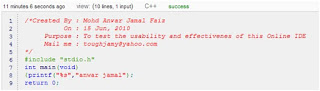
IDEOne gives you option to write you code online. It is really useful for beginners and evangelists. The best part is that you can write in 40+ languages. It provides you with details about code and its execution including the memory usage, execution time, compiler version, output generated by program and error messages. This service would be of great use when you have to quickly execute code and don’t have a desktop IDE installed.
You can check this out at Ideone Home page
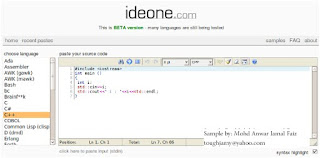
You can optionally turn on syntax highlighting for your code. Much more to see itself than description. But would be a nice online landup where you can learn and test some rare languages too.
You can also check out the public code snippets executed by other users. Ideone is free to use, does not require installation of any extra software or plug-ins, and can be used as a replacement for your existing desktop IDE.
I even tried with simple Python Code:

I was inquisitive to know on what machine is the code and this IDE really executing. I found out that using above code. Result came out to be ‘posix’.
I created this snippet to test a simple code on IDEOne in C++. And it worked properly!!

IDEOne gives you option to write you code online. It is really useful for beginners and evangelists. The best part is that you can write in 40+ languages. It provides you with details about code and its execution including the memory usage, execution time, compiler version, output generated by program and error messages. This service would be of great use when you have to quickly execute code and don’t have a desktop IDE installed.
You can check this out at Ideone Home page

You can optionally turn on syntax highlighting for your code. Much more to see itself than description. But would be a nice online landup where you can learn and test some rare languages too.
You can also check out the public code snippets executed by other users. Ideone is free to use, does not require installation of any extra software or plug-ins, and can be used as a replacement for your existing desktop IDE.
I even tried with simple Python Code:

I was inquisitive to know on what machine is the code and this IDE really executing. I found out that using above code. Result came out to be ‘posix’.
Subscribe to:
Posts (Atom)