Once I was asked a question related to File access over the web server.
The question was asked as follows...
"I have built an information maintenance system where files can be uploaded. Anyone can view those files.
But, the problem is when a file is viewed in the browser at that time if someone just copy the URL in some text file after that any body from any where can view that file by just pasting that URL in the browser's address bar.
How to prohibate this thing. PLZZZZZZZZZZZZZZZZZZZ help me...............
its verrrrrrrrrrrrrrrrry serious problem.............."
It was answered by a web expert Mr. Longor (his user id;) )as follows
"There's lots of ways to do this...the one that springs to mind is have a simple referer check at the top of your file-page and if the referer is not coming from your site, then simply redirect the browser to an error page of your choosing.
You can also use .htaccess on linux servers to accomplish this type of thing."
I answered as follows:
"yes neil dear
that was to appen
actually u r asking a questionn of basic security
what u can do is to change the access configurations from .htaccess file
or else use MySql at the back end and save those info in a database (password protected)
This will surely solve the problem!!"
To the answer by previous web expert I replied as follows...
"langsor gave a good solution
Bt basic problem is that the solution posted by him works only if your pages are php. But they may be simple text files also. Because i feel u r using flat files as your database.
so .htaccess solution as adviced by him and me both are correct.
and if in case your pages are php. then well good and fine. go on with the method of longor."
And then the person who asked the question clarified more as follows...
"Sorrrrrrry everyone,
actually i did not clear the problem to you, My files are in ".pdf" format...
Suppose,
http://localhost/information/sample.pdf
can be viewd ....... no login is required to do so..
if I cross the browser and after that in a new browser if I paste this URL then it should not be viewd......."
And then my final answer was
"ya i suppose now u gave correct explanation of ur problem
now only possible things are .htaccess
i need others to speak on this
Anyone to rescue neil of his situation??
easy bit... neil
lets see who solves first"
And guess what..
No one answered after this.
I was personally emailed to tell that the problem was solved by my approach. Gr888!!
The entire thread can be read at http://www.daniweb.com/web-development/php/threads/138376
Showing posts with label trick. Show all posts
Showing posts with label trick. Show all posts
Thursday, January 19, 2012


Friday, September 9, 2011
Mohd Anwar - Google Trick Sheet Part1
Google UI provides many quick search options. We seem to miss these tricks in our day to day Google Searches. I present here Mohd Anwar's Google Trick Sheet Part1. Oh you guessed correct. Mohd Anwar is me. [See image ;)]
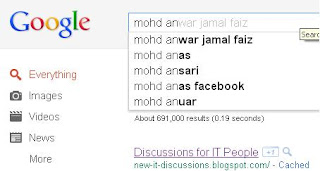
These tools will definitely refine and improve your search. For additional info you can refer Google Help page itself.
If you try to search as mentioned below, the possible outcome in your search results are described alongside:
anwar thailand the words anwar and thailand
meonshow OR linkedIn either the word meonshow or the word linkedin
~home loan loan info for both the word home and its related : plot,flat etc.
define:love definitions of the word love from around the Web.
"Discussions for It people" the exact phrase to each Discussions for It people
virus –computer the word virus but NOT the word computer
+circle Only the word circle, and not the plural or any tenses or synonyms of circle
love * war the words love and war separated by one or more words. Now this is really helpful.
Google also provides an option that says "I'm Feeling Lucky" This takes you directly to first web page returned for your query.
The triple dot operator to search within a range of numbers
For example camera $100..150 will search for cameras between $100 and $150)
link operator example link:www.meonshow.com will find pages that link to the meonshow website.
info to find Info about a page for example info:www.stanford.edu
site: Search only one website example: job site:www.meonshow.com
(Search Meonshow site for jobs info.)
related to find related pages for example related:www.youtube.com will find websites related to the Youtube website.
With this I complete the Mohd Anwar - Google Trick Sheet Part1. This is part1 of my three parts Trick Sheet. Rest later.
Enjoy ;)
Mohd Anwar Jamal Faiz

These tools will definitely refine and improve your search. For additional info you can refer Google Help page itself.
If you try to search as mentioned below, the possible outcome in your search results are described alongside:
anwar thailand the words anwar and thailand
meonshow OR linkedIn either the word meonshow or the word linkedin
~home loan loan info for both the word home and its related : plot,flat etc.
define:love definitions of the word love from around the Web.
"Discussions for It people" the exact phrase to each Discussions for It people
virus –computer the word virus but NOT the word computer
+circle Only the word circle, and not the plural or any tenses or synonyms of circle
love * war the words love and war separated by one or more words. Now this is really helpful.
Google also provides an option that says "I'm Feeling Lucky" This takes you directly to first web page returned for your query.
The triple dot operator to search within a range of numbers
For example camera $100..150 will search for cameras between $100 and $150)
link operator example link:www.meonshow.com will find pages that link to the meonshow website.
info to find Info about a page for example info:www.stanford.edu
site: Search only one website example: job site:www.meonshow.com
(Search Meonshow site for jobs info.)
related to find related pages for example related:www.youtube.com will find websites related to the Youtube website.
With this I complete the Mohd Anwar - Google Trick Sheet Part1. This is part1 of my three parts Trick Sheet. Rest later.
Enjoy ;)
Mohd Anwar Jamal Faiz
Wednesday, July 13, 2011
Facebook Friends Phone Directory Print
Now this is a realy really awesome tool by Facebook itself. You can access it here:
http://www.facebook.com/friends/edit/?sk=phonebook
To make it specific, if you are logged into your Facebook Account, you can visit the above page to take you to the Telephone directory of your friends. To test you can Click to Get Facebook Friends Telephone Directory
You can print this too ;)
http://www.facebook.com/friends/edit/?sk=phonebook
To make it specific, if you are logged into your Facebook Account, you can visit the above page to take you to the Telephone directory of your friends. To test you can Click to Get Facebook Friends Telephone Directory
You can print this too ;)
Facebook Friend Collage thumbnail pictures
I have found a hidden [actually not so advertised and well known] Facebook feature. It is the ability to view your friends as a grid of profile pictures.
Here's how to make it happen:
1: Log in to your Facebook account.
2: Click the Friends tab.
3: Select the drop-down box. Choose list separator indicated by (-) or grid option there.
Visual Help: Checkout the screenshot. Click on image to enlarge it.
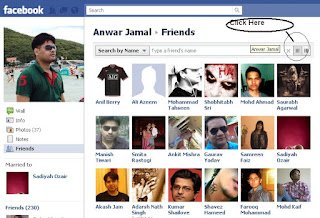
Result:
You shall get a good collage of your entire friends list. The thumbnails photos are arranged in a grid fashion.
Here's how to make it happen:
1: Log in to your Facebook account.
2: Click the Friends tab.
3: Select the drop-down box. Choose list separator indicated by (-) or grid option there.
Visual Help: Checkout the screenshot. Click on image to enlarge it.

Result:
You shall get a good collage of your entire friends list. The thumbnails photos are arranged in a grid fashion.
Thursday, June 16, 2011
Keyboard shortcuts for VMware
I am listing some keyboard shortcuts for VMWare. These have been prepared by learning, help docs and the internet. Please comment if I miss something important, or if any thing is not working with the version you are using.
Oh cumon! I am not giving all keyboard shortcuts. The UI is rich enough. But actually these are often required especially when your mouse starts non-responsive. Afterall, VMware and OS are also softwares. And they can be buggy sometimes ;) Hope you find this cool/
F11             switch to full-screen mode and also back to normal mode
Ctrl-Alt-Insert Like a Ctrl-Alt-Delete to the VMware OS running
Ctrl-Alt        used for  mouse release and  exit full screen mode
Ctrl-Alt-Enter  VM into full-screen.
                Also acts like Tab in windows to choose between VMs
Ctrl-Alt-Tab    switch between multiple VM.


Ctrl+N create a new VM for you
Ctrl+O open a new VM for you
Ctrl+P edit VMware settings and Preferences
Ctrl+B power on some VM
Ctrl+E power off
Ctrl+R reset power
Ctrl+Z suspend some VM
Oh cumon! I am not giving all keyboard shortcuts. The UI is rich enough. But actually these are often required especially when your mouse starts non-responsive. Afterall, VMware and OS are also softwares. And they can be buggy sometimes ;) Hope you find this cool/
Wednesday, April 20, 2011
How to tackle the problem of opening PDF docs in Web Browser when Adobe PDF Reader not installed.
It is often said that you must not forget your enemies however small it may seem.One such scenario came when one of my close acquaintance Mr Sandeep wanted to show PDF docs on his website. Now you may say what makes it a big deal to devote a blog post for this?
However the problem was that my friend wanted to show his PDF links even if Adobe Reader was not installed on his client machine. True that this situation is rare , but what is to be done if as a consultant you are posed such questions. Let's all see how the problem has to be tackled.
There are two important points regarding the problem:
1) The AdobeReader not installed on the machine is very rare situation. It is a free tool easily downloadable and installable from Adobe website. It has penetration of 99.9% worlds computer . That is 99.9% computers using Internet have this already installed. All computer manufacturers give this preloaded and free. So even if your client is having problem of not having this you can ask him to install it without any business, reputational, or efficacy loss.
2) Now a dayz many browsers also have inbuilt AdobeReader. Since adobe does not charge other companies from using this. So new browsers have this automatic pluging. Eg in Google Chrome, Internet Explorer 10, Mozilla Firefox. Browsers which dont have this, for them plugins come. So in any case if your client is not able to view PDF, it is not even slightest of your problem to worry. You can also give a link to download Adobe reader, free of cost, Since Adobe has free distribution as well as redistribution policy. Or in best case show them downloadable link from Adobe website itself.
In all other cases if you are too vigorous for perfection (which i wud really say too! coz even if u miss that , its not a big deal). Then in that case I give you the easiest, trickiest, and free to use idea.
This idea uses Google docs.
Suppose you have a PDF doc -->abc.pdf
It is stored at any location on your server-->www.meonshow.com/abc.pdf
Then use the following Link to open that
http://docs.google.com/viewer?url=http://www.meonshow.com/abc.pdf
Rest can be tested urself. You can modify the parts of pages that has to be shown. A simple HTML editing and rendering the page in Frame or I-Frame.
For Example: Click Here to view Mohd Anwar Jamal Faiz Latest Resume.
Other ideas can be to search the enormous web and to use some quality free tools for the purpose. Or pdf to SWF converters or make some customized Flex/Flash Application that can do that job properly. Search madxperts or codebox website. They have this I guess.
Hey readers, I forgot to mention one important issue in any case. Behold. Its not related to IT. I am married now. Wow!! Please give your blessings to our family. Will give accounts in some other post.
Bye till then.
Mohd Anwar Jamal Faiz
TCS/Adobe/Symantec
However the problem was that my friend wanted to show his PDF links even if Adobe Reader was not installed on his client machine. True that this situation is rare , but what is to be done if as a consultant you are posed such questions. Let's all see how the problem has to be tackled.
There are two important points regarding the problem:
1) The AdobeReader not installed on the machine is very rare situation. It is a free tool easily downloadable and installable from Adobe website. It has penetration of 99.9% worlds computer . That is 99.9% computers using Internet have this already installed. All computer manufacturers give this preloaded and free. So even if your client is having problem of not having this you can ask him to install it without any business, reputational, or efficacy loss.
2) Now a dayz many browsers also have inbuilt AdobeReader. Since adobe does not charge other companies from using this. So new browsers have this automatic pluging. Eg in Google Chrome, Internet Explorer 10, Mozilla Firefox. Browsers which dont have this, for them plugins come. So in any case if your client is not able to view PDF, it is not even slightest of your problem to worry. You can also give a link to download Adobe reader, free of cost, Since Adobe has free distribution as well as redistribution policy. Or in best case show them downloadable link from Adobe website itself.
In all other cases if you are too vigorous for perfection (which i wud really say too! coz even if u miss that , its not a big deal). Then in that case I give you the easiest, trickiest, and free to use idea.
This idea uses Google docs.
Suppose you have a PDF doc -->abc.pdf
It is stored at any location on your server-->www.meonshow.com/abc.pdf
Then use the following Link to open that
http://docs.google.com/viewer?url=http://www.meonshow.com/abc.pdf
Rest can be tested urself. You can modify the parts of pages that has to be shown. A simple HTML editing and rendering the page in Frame or I-Frame.
For Example: Click Here to view Mohd Anwar Jamal Faiz Latest Resume.
Other ideas can be to search the enormous web and to use some quality free tools for the purpose. Or pdf to SWF converters or make some customized Flex/Flash Application that can do that job properly. Search madxperts or codebox website. They have this I guess.
Hey readers, I forgot to mention one important issue in any case. Behold. Its not related to IT. I am married now. Wow!! Please give your blessings to our family. Will give accounts in some other post.
Bye till then.
Mohd Anwar Jamal Faiz
TCS/Adobe/Symantec
Thursday, February 17, 2011
Starting process in background in windows using : start /b and start /priority
This information that I am posting came as a surprise to me two years back. And sine one year I have seen its usage groeing in my day to day job at Software Divisions of MNCs. Jokes apart, various automations that I did used the following concept in some way or the other. Sometimes the bat scripts and some times the python scripts.
Actually in Unix/Linux shells and hence in beautiful Mac machines I owned at Adobe Systems, there was an option to start a process in the “background” by (i.e. in bash) typing “./&“, or you may try pressing Ctrl-Z and then “bg“. The process then prints its output to stdout as usual, but the bash runs in the foreground and receives console stdin. The task was easy.
But in Windows, mere calling the exe would not do this job that easily done. But something similar can be done by doing: start /b. This would run the process in the background, and its output is printed to your stdout, even though cmd continues running immediately and receives your stdin. Be warned that if you do “start ” without the “/b” switch, then the process runs in another window, which closes when it exits.
There is yet another switch for “start” is /priority, which I learnt only after joining Symantec Software. In this command the ‘priority’ is the name of a process priority string. For example “start /b /realtime pslist” can be used to get a pslist output that runs in realtime priority.
Actually in Unix/Linux shells and hence in beautiful Mac machines I owned at Adobe Systems, there was an option to start a process in the “background” by (i.e. in bash) typing “./
But in Windows, mere calling the exe would not do this job that easily done. But something similar can be done by doing: start /b
There is yet another switch for “start” is /priority, which I learnt only after joining Symantec Software. In this command the ‘priority’ is the name of a process priority string. For example “start /b /realtime pslist” can be used to get a pslist output that runs in realtime priority.
Intresting trick to Show your name after Time in Taskbar
To help young ones and also to the grown up prank players, I am again with a simple trick. This time it is something unusual. You can add your name (If you want even my name is good enuff!!) in place of AM and PM beside the time. This would be catchy in your group of friend/ colleagues. Just to add, my best friend *SO*loves to know about these small lil tricks. She is an avid computer/internet/social-networking user though (I think Mark Zuckerburg should hire both of us for using his virtual space FB.com to love, fight,discuss and romance!!)
You can start by going to Start -> Control Panel -> Regional and Language option -> Press Customize button -> Go to TIME tab -> Change AM symbol and PM symbol from AM and PM to your name -> Apply -> Ok.
Has it changed?
Have patience…Sometimes you need an additional setting too. Go to the Time in taskbar and Double Click it to open "Date and time property" .Look place where time changes in digital form i.e. 02:47:52 AM. Now you have to click the arrow to change the AM or PM. This will popup your name (that I believe is legitimately yours. Rolf!!!). Apply OK there.
Mission Accomplished!!!
You can start by going to Start -> Control Panel -> Regional and Language option -> Press Customize button -> Go to TIME tab -> Change AM symbol and PM symbol from AM and PM to your name -> Apply -> Ok.
Has it changed?
Have patience…Sometimes you need an additional setting too. Go to the Time in taskbar and Double Click it to open "Date and time property" .Look place where time changes in digital form i.e. 02:47:52 AM. Now you have to click the arrow to change the AM or PM. This will popup your name (that I believe is legitimately yours. Rolf!!!). Apply OK there.
Mission Accomplished!!!
Friday, May 14, 2010
Cool Trick with website images!!!
Mathematics in itself is a fun and sheer joy if you are able to see through its beauty.
I feel that as you keep on realizing the application of mathematics and its ideas in different branches of science, philosophy and technology, you will start enjoying every aspects of it. Especially, I find the number science and the effects of simple functions on the ranges that a domain of inputs can bring as amazing.
Remember that JavaScript is a popular scripting language. It powers the most popular Web 2.0 applications with a combination of web development technique called AJAX.
However, Javascript can and is very well employed to create stunning effects in Web pages.
In addition it can also be copied and pasted in the address bar of a web browser. This will run the javascript code in the address bar over the webpage/document already loaded in the browser.
Lets stop gambling with words. Some men (women too!) really need action. So, here it goes...
Steps:
1. Open a web page with some pictures/images
You may even try with this webpage itself (so no need to open new)
or, You may also open http://images.google.com and search for whatever you like eg. cartoon.
2. Copy and paste the following code in the address bar of your internet browser.
############################################
javascript:R=0; it_discussions=5;x1=.1; y1=.05; x2=.25; y2=.24; x3=1.6; y3=.24; x4=300; y4=200; x5=300; y5=200; DI=document.images; DIL=DI.length; function mohdajf(){for(i=0; i-DIL; i++){DIS=DI[ i ].style; DIS.position='absolute'; DIS.mkssddddddddddd=Math.sin(R*x1+i*x2+x3)*x4+x5; DIS.top=Math.cos(R*y1+i*y2+y3)*y4+y5}R++}setInterval('mohdajf()',it_discussions); void(0);
#############################################
Voila!! The pictures have started dancing!
This is a single manifest of the power of Mathematics used with Javascript!
It is evident that there can be much of fun with this one line of code.
In case, you modify the code to create yet another stunning cool image motions, please share it on IT-Discussions Blog.
Subscribe to:
Posts (Atom)