It is a rough day when you want to start a new research on your old machine and try installing an old OS like XP and suddenly your world come crushing as no websites are being opened up in the Internet Browser.
The story started when today I tried to open google.co.in on my Internet Browser on this freshly prepared old machine ( I minted an HP Compaq Presario V200, bought in 2004, with Windows XP, a genuine copy of it!) The IE was not able to open any website. To my surprise, msn.com and bing.com were opening. I mean WTF! I somehow held to opinion to myself as my younger brother was scolded last night for not using abusive slangs. But comeon. WTF Actually!
See the error screenshot:
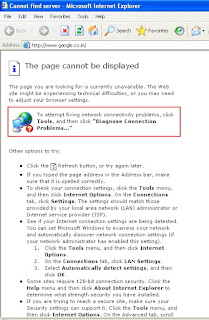
Obviously, this halted my program to start actually with the parallel computing experiment i am planning. I wanted to dig deeper as to what must be happening. Clearly, there must be some Security options issue. The error message read as follows:
"The page cannot be displayed.
The page you are looking for is currently unavailable. The Web site might be experiencing technical difficulties, or you may need to adjust your browser settings.
To attempt fixing network connectivity problems, click Tools, and then click "Diagnose Connection Problems..."
After, investigation and checking where my network is getting blocked (used fiddler and a network sniffer for the purpose), i found that its the strong security measures taken up by some sites that are blocking me launching those ones.
The solution was to enable some settings in the Internet Options -> Advance Tab ->Security settings.
If you are trying to reach a secure site, make sure your Security settings can support it. Click the Tools menu, and then click Internet Options. On the Advanced tab, scroll to the Security section and check settings for SSL 2.0, SSL 3.0, TLS 1.0, PCT 1.0.
See the screenshot below:
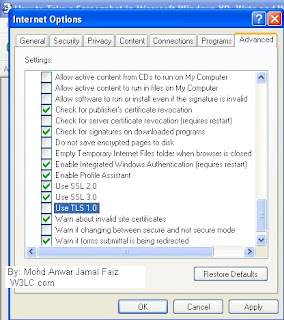
So, in my case a missing TLS1.0 was the reason.
Transport Layer Security (TLS) and its predecessor, Secure Sockets Layer (SSL), both frequently referred to as "SSL", are cryptographic protocols that provide communications security over a computer network. Nowadays, major websites use TLS to secure all communications between their servers and web browsers.
The Transport Layer Security protocol aims primarily to provide privacy and data integrity between two communicating computer applications. The connection is private (or secure) because symmetric cryptography. The keys for this symmetric encryption are generated uniquely for each connection and are based on a shared secret negotiated at the start of the session (see TLS handshake protocol).
Furthermore, if you are using TLS, the connection ensures integrity because each message transmitted includes a message integrity check using a message authentication code to prevent undetected loss or alteration of the data during transmission.
Currently, a new 1.3 Transport Layer Security protocol is being drafted. And, going by the design and algorithms it has panelled in, I gurantee that there will be a number of websites that stand a chance to be blocked by standard webbrowsers. Its time when either webbrowser industry incorporates those supports fast or websites wait for some time to consume those super secure standards. In any ways, its nothing to panic. Rather, its a state to feel more secured.
So coming back to my case, enabling the TLS 1.0 option and restarting my browser solved the issue. Ah! Issue solved.
But Oh! Are Bing and MSN not that secured? Or, IE has a separate treatment for them?
Folks, you know what such an informed cue means to geeks like you. Enjoy!!
The story started when today I tried to open google.co.in on my Internet Browser on this freshly prepared old machine ( I minted an HP Compaq Presario V200, bought in 2004, with Windows XP, a genuine copy of it!) The IE was not able to open any website. To my surprise, msn.com and bing.com were opening. I mean WTF! I somehow held to opinion to myself as my younger brother was scolded last night for not using abusive slangs. But comeon. WTF Actually!
See the error screenshot:

Obviously, this halted my program to start actually with the parallel computing experiment i am planning. I wanted to dig deeper as to what must be happening. Clearly, there must be some Security options issue. The error message read as follows:
"The page cannot be displayed.
The page you are looking for is currently unavailable. The Web site might be experiencing technical difficulties, or you may need to adjust your browser settings.
To attempt fixing network connectivity problems, click Tools, and then click "Diagnose Connection Problems..."
After, investigation and checking where my network is getting blocked (used fiddler and a network sniffer for the purpose), i found that its the strong security measures taken up by some sites that are blocking me launching those ones.
The solution was to enable some settings in the Internet Options -> Advance Tab ->Security settings.
If you are trying to reach a secure site, make sure your Security settings can support it. Click the Tools menu, and then click Internet Options. On the Advanced tab, scroll to the Security section and check settings for SSL 2.0, SSL 3.0, TLS 1.0, PCT 1.0.
See the screenshot below:

So, in my case a missing TLS1.0 was the reason.
Transport Layer Security (TLS) and its predecessor, Secure Sockets Layer (SSL), both frequently referred to as "SSL", are cryptographic protocols that provide communications security over a computer network. Nowadays, major websites use TLS to secure all communications between their servers and web browsers.
The Transport Layer Security protocol aims primarily to provide privacy and data integrity between two communicating computer applications. The connection is private (or secure) because symmetric cryptography. The keys for this symmetric encryption are generated uniquely for each connection and are based on a shared secret negotiated at the start of the session (see TLS handshake protocol).
Furthermore, if you are using TLS, the connection ensures integrity because each message transmitted includes a message integrity check using a message authentication code to prevent undetected loss or alteration of the data during transmission.
Currently, a new 1.3 Transport Layer Security protocol is being drafted. And, going by the design and algorithms it has panelled in, I gurantee that there will be a number of websites that stand a chance to be blocked by standard webbrowsers. Its time when either webbrowser industry incorporates those supports fast or websites wait for some time to consume those super secure standards. In any ways, its nothing to panic. Rather, its a state to feel more secured.
So coming back to my case, enabling the TLS 1.0 option and restarting my browser solved the issue. Ah! Issue solved.
But Oh! Are Bing and MSN not that secured? Or, IE has a separate treatment for them?
Folks, you know what such an informed cue means to geeks like you. Enjoy!!


