My First Post      My Facebook Profile      My MeOnShow Profile      W3LC Facebook Page      Learners Consortium Group      Job Portal      Shopping @Yeyhi.com

Pages


Thursday, May 10, 2018

How to add custom Ads.txt in Blogger : A must for blogger adsense monetization enthusiasts

When you want to add monetization to your blog and you have a publisher Id, you want to set it up fast. Am i correct? Afterall, why to loose even a single day of your sweet traffic.


But the problem sometimes is that the website you own is on Blogger and you have no ideas as to how and where to add the custom ads.txt file required by the blogger. Sounds known! Yeah, this is a usual problem with many. So lets start step by step:


First of all know that ,if your blog is monetized with third-party providers or you’ve manually integrated AdSense in your blog, you will need to manually set up the content of the ads.txt file.


  • Sign in to Blogger.
  • In the top left, click the Down arrow Down Arrow .
  • Click the blog you want to set up an ads.txt file on.
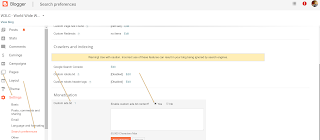
  • On the left, click Settings.
  • Under "Settings," click Search preferences.
  • Under "Monetization," find "Custom ads.txt" and click Edit.
  • Click Yes.
  • Copy the settings from your third-party monetization provider and paste them in the text box. This is typically like "google.com, pub-<0000000000>, DIRECT, 00000000"
  • Click Save settings.


Cheers! It's done.


If you want to check the content of your ads.txt file, go to http:///ads.txt.


Also, do note that if your blog is not monetized, or it’s only configured to use AdSense using the Blogger-AdSense integration, then you do not need to manually set up ads.txt. Blogger will do this for you. Read more about ads.txt for AdSense.


Now certainly, wait for 24 hours before the money starts flowing in your blog. Surely, you might want to thank me. For that just like the post and share to others who might help themselves as well.


Saturday, April 21, 2018

AMU interview for class 9. Syllabus, aim and what to expect

The questions are general in nature. The syllabus is precisely the same as that of entrance exam. However, it is not the test of students academic knowledge. Rather it's a personality and aptitude check in relation to other candidates.

Sample questions are:

1. Give us a Short Introduction about you.

Well, this is the most commonly and necessarily asked question in almost all the Interviews. Prepare a short and specific introduction about yourself. Remember do not talk vague or

out-of the point. They're asking you about yourself, so just stick to it. Your Name, then Family and Schooling combined with your interests and hobbies will do the impression.Try to be fluent and maintain an eye contact.

2. Why do you want to join Aligarh Muslim University.

Another Big question, and you must answer it well. Though anyone and everyone applying for the Entrance Test would probably want to join the University, but you must stand out somewhere. Here you don't need to be buttery, rather say out the true reason why you would join it. Try to be precise, leave an impression; say what you love about the university, tell them your dreams and how it related to that.Remember, just say what your heart speaks out, don't butter!

3. Tell us about your Aim in life.

Elaborate your dream, your aim, what you want to do in the future, as a person, in your career. And more importantly, why would you do so. For example, suppose you want to be a Doctor, tell them why you want to a doctor only! Tell them, how you plan to achieve your goal. This will leave a positive impression with them, and as far as the experts say, proactive nature is a big factor for selections in interviews.

And it's always like, if they know the child is deserving and is on a bright path; they're surely going to select you.

4. What's your favorite subject?

Further there may be questions testing your skills in your subjects, and they'll be specific. The subject you speak out as your favorite or that seems to be interesting for you, will give you questions! If you have your favorite subject as Science, there may be basic questions from Science, testing your general skills, If your favorite subject is English, they could ask you to say out a phrase or verse.

5. General Knowledge and Awareness

You also need to practice questions on general awareness. These are usually basic questions on current affairs, and other general topics.This section won't fire tough questions. You'll be able to answer the questions well if you have some awareness about the world around you.

6. Situations to have Psychometric Analysis

It is a relatively easier section, there will be simple situations or question on your behavior to certain problems and day-to-day events. Just be what you are, in a slight proactive attitude, you'll do well.

Basically, it's not a different planets thing. You are the one who has cleared the Entrance test, and you have the caliber. Just trust yourselves, have faith in god, and move ahead. Don't panic and reply what you know about the topic, talk to the interviewers and share your experiences and ideas.

Note: Writer Mohd Anwar Jamal Faiz is an alumni of Aligarh Muslim University. An engineering graduate, poet and a social activist, has been helping student of all ages securing good ranks in entrance examinations and choose best career options.

Tuesday, April 17, 2018

Free Website Hosting - Make Free website. Start and launch websites for free

Free Website Hosting - Make Free website
Web hosting


This is a unique way to launch your own website. Click on the given link and start with the world of websites. Free website with zero money. Get domain and hosting space for free. Awesome way to start new journey of entrepreneurship.

  Web hosting


Free cPanel Web Hosting with PHP5/Mysql - no advertising!
Register now: https://www.000webhost.com/708718.html

We can offer you a free web hosting package packed with advanced features for hosting & building professional dynamic websites. We provide secure free web space with all the web hosting tools you could possibly ever need.

Our package includes:
- 1500 MB of Disk Space, 100 GB Bandwidth 
- Host your own domain (https://www.yourdomain.com)
- cPanel Powered Hosting (you will love it)
- Over 500 website templates ready to download
- Easy to use website builder
- Free POP3 Email Box with Webmail access
- FTP and Web based File Manager 
- PHP, MySQL, Perl, CGI, Ruby.
- And many more..

Click here to visit us: https://www.000webhost.com/708718.html


Thursday, November 23, 2017

How can I open a cmd window in a specific location on Windows

Hi,

This hack will help you in many ways. And, shall help you many ways too!
This is a part of my initiative to post simple tricks aimed to Help/ease a QA Day to day life. These Tech Hacks are very handy but increase your efficiency much.

So, for our case today - How can I open a cmd window in a specific location on Windows; I provide two methods:

Trick 1:

If the folder is opened.
Click on address bar, alternatively press Alt+D
Now when address bar is highlighted, type cmd in the bar.
Press Enter key
You will notice that command prompt from that folder


Trick 2:

In the folder. Press Shift and then Right Click

A option appears -> Open Command Window here.


Press that. It will open a command window with present working directory as the selected hotel

Friday, November 17, 2017

Difference between Nuget and Chocolatey

NuGet is designed to allow you to easily add code libraries to your project. Things like JSON.NET, Entity Framework, etc.


Chocolatey is actually built on top of the NuGet package system, but it is designed to fill a different need. Chocolatey wraps up applications and other executables and makes it easy to install them on your computer. For example, tools like Git and Notepad++, etc. can be easily installed with a command like: cinst git.


To know more about chocolate and how to install it please refer my earlier blog post on W3LC : http://www.w3lc.com/2017/11/what-is-chocolatey-and-how-to-install.html


https://chocolatey.org/packages has a list of all the applications that can be installed.


If you have an open source project which is a library that is to be used in other developers' projects, then you should submit it to NuGet.


If it is an application that users would normally install, then create a Chocolatey package that users can easily install and update from the command line.


Details of different Package manager tools and where does Chocolate fits in:


OneGet has been renamed to Package management. It's core provides you with discovery and installation/uninstallation of various packages. OneGet is often referred to as a "package manager manager".

OneGet is a part of WMF 5 installation. Think of this as the "central concept" in the big picture. Now let's talk about packages.

Packages are fetched through package providers. E.g. PowerShellGet is one package provider for OneGet. Powershell gallery is a package source of of PowershellGet (PSGet). A provider can have multiple sources where it can search for it's packages.

E.g for the nuget-package provider; you can easily add the sources to the public nuget gallery and register your own e.g. myget source so it can be used when searching for packages.

Chocolatey is just another example of a package provider. Earlier it had to be installed and was a seperate module with it's own logic. The new Chocolatey provider conforms to the new framework of installing / managing packages.

So on a more conceptual level; a package provider itself contains information on how to install and search it's sources (sources can be registered/unregistered for each and every provider); whilst OneGet (Package management, package manager manager) works on the level above, managing package providers and interfacing this all for you.

OneGet glues it all together; while the providers itself knows how to handle packages based on it's registered sources.

Hope this explains it on the conceptual level.

See also this nice blogpost here explaining a few things more in detail:https://blogs.technet.microsoft.com/packagemanagement/2015/05/05/10-things-about-oneget-that-are-completely-different-than-you-think/

If you want to play around with package providers and sources :

 Get-PackageProvider # -Shows package providers installed on your machine)
 Find-PackageProvider # -Find online package providers you can pull down and install)
 Get-PackageSource # -List all package sources, with it's provider name)
 Register-PackageSource # -Register new package source for a provider)