When you want to add monetization to your blog and you have a publisher Id, you want to set it up fast. Am i correct? Afterall, why to loose even a single day of your sweet traffic.
But the problem sometimes is that the website you own is on Blogger and you have no ideas as to how and where to add the custom ads.txt file required by the blogger. Sounds known! Yeah, this is a usual problem with many. So lets start step by step:
First of all know that ,if your blog is monetized with third-party providers or you’ve manually integrated AdSense in your blog, you will need to manually set up the content of the ads.txt file.
Cheers! It's done.
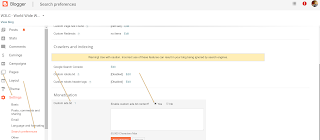
If you want to check the content of your ads.txt file, go to http:///ads.txt.
Also, do note that if your blog is not monetized, or it’s only configured to use AdSense using the Blogger-AdSense integration, then you do not need to manually set up ads.txt. Blogger will do this for you. Read more about ads.txt for AdSense.
Now certainly, wait for 24 hours before the money starts flowing in your blog. Surely, you might want to thank me. For that just like the post and share to others who might help themselves as well.
But the problem sometimes is that the website you own is on Blogger and you have no ideas as to how and where to add the custom ads.txt file required by the blogger. Sounds known! Yeah, this is a usual problem with many. So lets start step by step:
First of all know that ,if your blog is monetized with third-party providers or you’ve manually integrated AdSense in your blog, you will need to manually set up the content of the ads.txt file.
- Sign in to Blogger.
- In the top left, click the Down arrow Down Arrow .
- Click the blog you want to set up an ads.txt file on.
- On the left, click Settings.
- Under "Settings," click Search preferences.
- Under "Monetization," find "Custom ads.txt" and click Edit.
- Click Yes.
- Copy the settings from your third-party monetization provider and paste them in the text box. This is typically like "google.com, pub-<0000000000>, DIRECT, 00000000"
- Click Save settings.
Cheers! It's done.

If you want to check the content of your ads.txt file, go to http://
Also, do note that if your blog is not monetized, or it’s only configured to use AdSense using the Blogger-AdSense integration, then you do not need to manually set up ads.txt. Blogger will do this for you. Read more about ads.txt for AdSense.
Now certainly, wait for 24 hours before the money starts flowing in your blog. Surely, you might want to thank me. For that just like the post and share to others who might help themselves as well.


